Upgrade to Pro
— share decks privately, control downloads, hide ads and more …
Speaker Deck
Sign up for free
Menu
Search
Features
All features
Private URLs
Password Protection
Custom URLS
Scheduled publishing
Remove Branding
Restrict embedding
Deck Collections
Notes
Features
All features
Private URLs
Password Protection
Custom URLS
Scheduled publishing
Remove Branding
Restrict embedding
Deck Collections
Notes
Explore
Featured decks
Featured speakers
Programming
Technology
Storyboards
Explore
Featured decks
Featured speakers
Programming
Technology
Storyboards
Pricing
Search
Sign in
Sign up for free
MCP ✖️ Apps SDKを触ってみた
Search
Sponsored
·
Your Podcast. Everywhere. Effortlessly.
Share. Educate. Inspire. Entertain. You do you. We'll handle the rest.
→
hisuzuya
October 22, 2025
Technology
770
0
Share
Embed
Copy iframe code
Copy JS code
Copy link
Start on current slide
MCP ✖️ Apps SDKを触ってみた
hisuzuya
October 22, 2025
More Decks by hisuzuya
See All by hisuzuya
Jev の中身は50行で再現できる。でも本物との差はどこにあるのか
hisuzuya
0
120
OSS・MCP・AIエージェントでつくる、AIネイティブな組織
hisuzuya
0
9
Cloudflare OS から考える、SaaS の次のかたち
hisuzuya
0
18
選ぶ・採点する・確率を返す — Jevの使いどころ入門
hisuzuya
0
83
SaaS is Dead?|AI時代、まずOSSを試す
hisuzuya
0
37
AI駆動開発の本音 〜Claude Code並列開発で見えたエンジニアの新しい役割〜
hisuzuya
4
660
AIが自分でバグを見つけて直す時代が来た
hisuzuya
0
54
git worktree × Claude Code × MCP ~生成AI時代の並列開発フロー~
hisuzuya
1
1.2k
Other Decks in Technology
See All in Technology
AI時代、つくる力を自分たちの手に。 ──電通×KAG、アジャイルとAI駆動開発で挑む開発の変革
yuukiyo
3
410
AIに任せられるFlutterコードベースを作る 〜仕様をコードで表し、ハーネスで守る〜
myohei
1
340
ガチで放置できるClaude Code実行環境の作り方.pdf
lamaglama39
5
9.9k
cdk deployとcdkd deploy、実際にデプロイして5倍速近くの差を実測した
yama3133
1
110
Claude Code on Bedrock で統制をかける小ネタ集/claude-code-bedrock-governance-tips
emiki
1
13k
1週間、Opus封印でお願いします
kintotechdev
0
340
なぜAI時代に技術記事を書くのか?どう書くのか? 〜bunの場合〜
kworkdev
PRO
0
160
Don't write the architecture only in the prompt.
neohsu
0
170
AI駆動開発におけるハーネスエンジニアリングの勘所
tsukuboshi
1
820
AIで選択肢が広がった組織設計の理想と現実
konifar
15
6.6k
"計画的無茶振り"を通してAIネイティブ世代の新人を育てる
subroh0508
1
120
キヨさん67歳 AIコーディングエージェント物語
happysamurai294
0
120
Featured
See All Featured
Stop Working from a Prison Cell
hatefulcrawdad
274
21k
Abbi's Birthday
coloredviolet
4
10k
My Coaching Mixtape
mlcsv
0
370
Sam Torres - BigQuery for SEOs
techseoconnect
PRO
0
590
Evolving SEO for Evolving Search Engines
ryanjones
0
330
Templates, Plugins, & Blocks: Oh My! Creating the theme that thinks of everything
marktimemedia
31
2.9k
Beyond borders and beyond the search box: How to win the global "messy middle" with AI-driven SEO
davidcarrasco
3
280
Primal Persuasion: How to Engage the Brain for Learning That Lasts
tmiket
0
500
The SEO identity crisis: Don't let AI make you average
varn
0
610
Mind Mapping
helmedeiros
1
410
[SF Ruby Conf 2025] Rails X
palkan
3
1.5k
Sharpening the Axe: The Primacy of Toolmaking
bcantrill
46
3k
Transcript
MCP Apps SDKを触って みた 株式会社RAYVEN 鈴山英寿 1
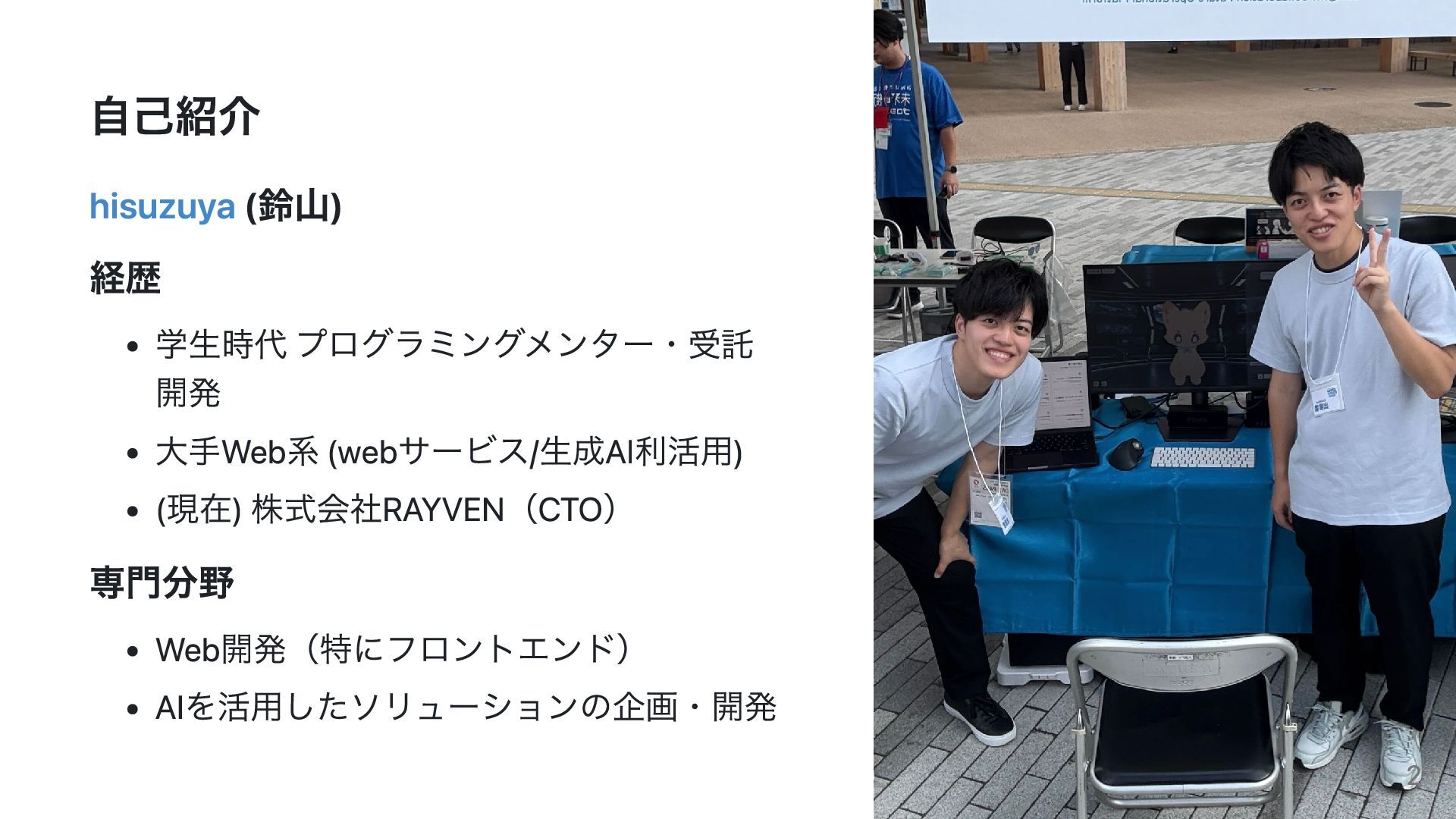
自己紹介 hisuzuya (鈴山) 経歴 学生時代 プログラミングメンター・受託 開発 大手Web系 (webサービス/生成AI利活用) (現在)
株式会社RAYVEN(CTO) 専門分野 Web開発(特にフロントエンド) AIを活用したソリューションの企画・開発 2
アジェンダ 1. MCPとは - Model Context Protocolの概要 2. Apps SDKとは
- ChatGPT Apps SDKの紹介 3. デモ・実例紹介 - 実際の活用事例 3
MCP について 4
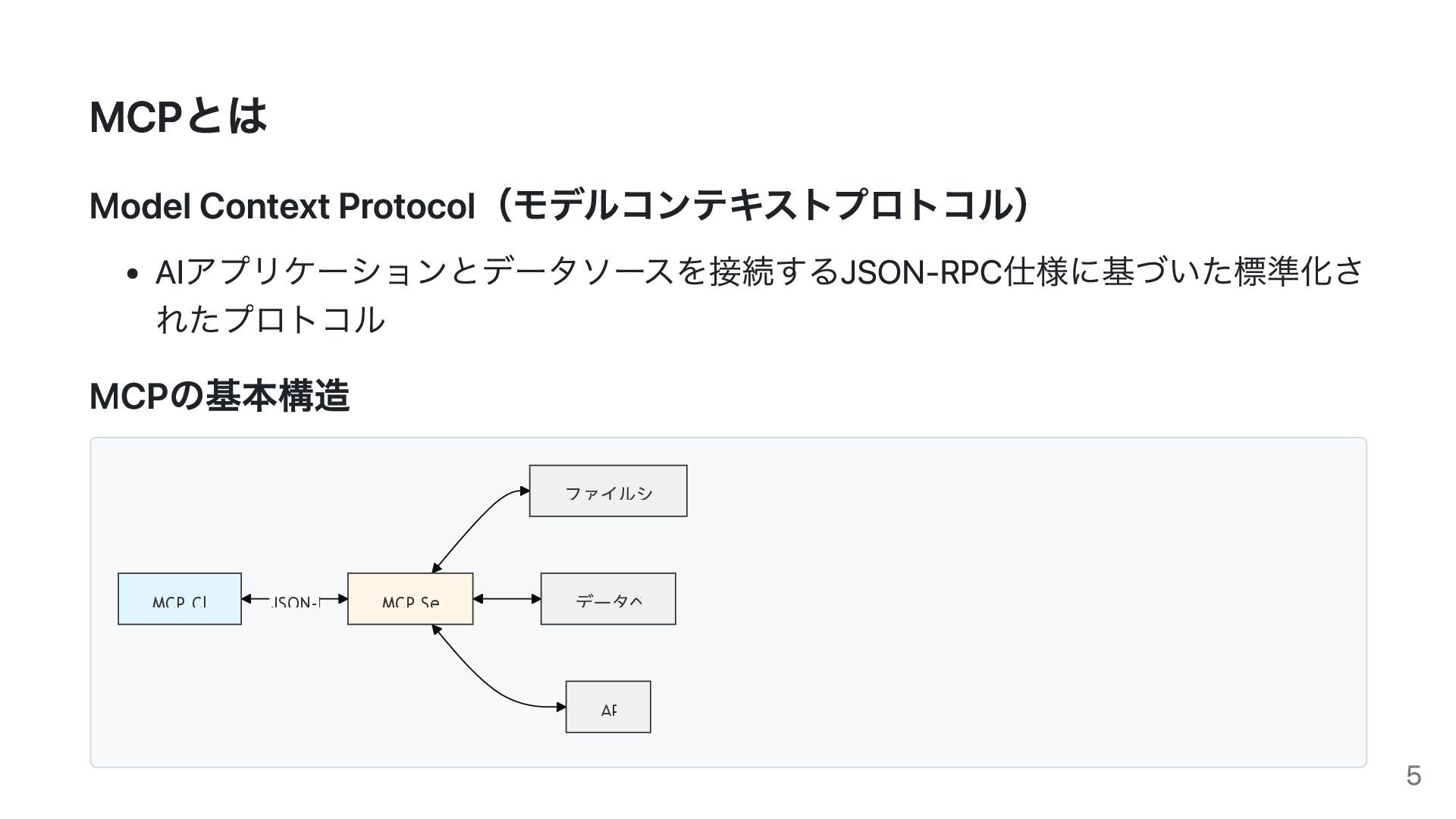
MCPとは Model Context Protocol(モデルコンテキストプロトコル) AIアプリケーションとデータソースを接続するJSON-RPC仕様に基づいた標準化さ れたプロトコル MCPの基本構造 JSON-R MCP Cl
MCP Se ファイルシ データベ AP 5
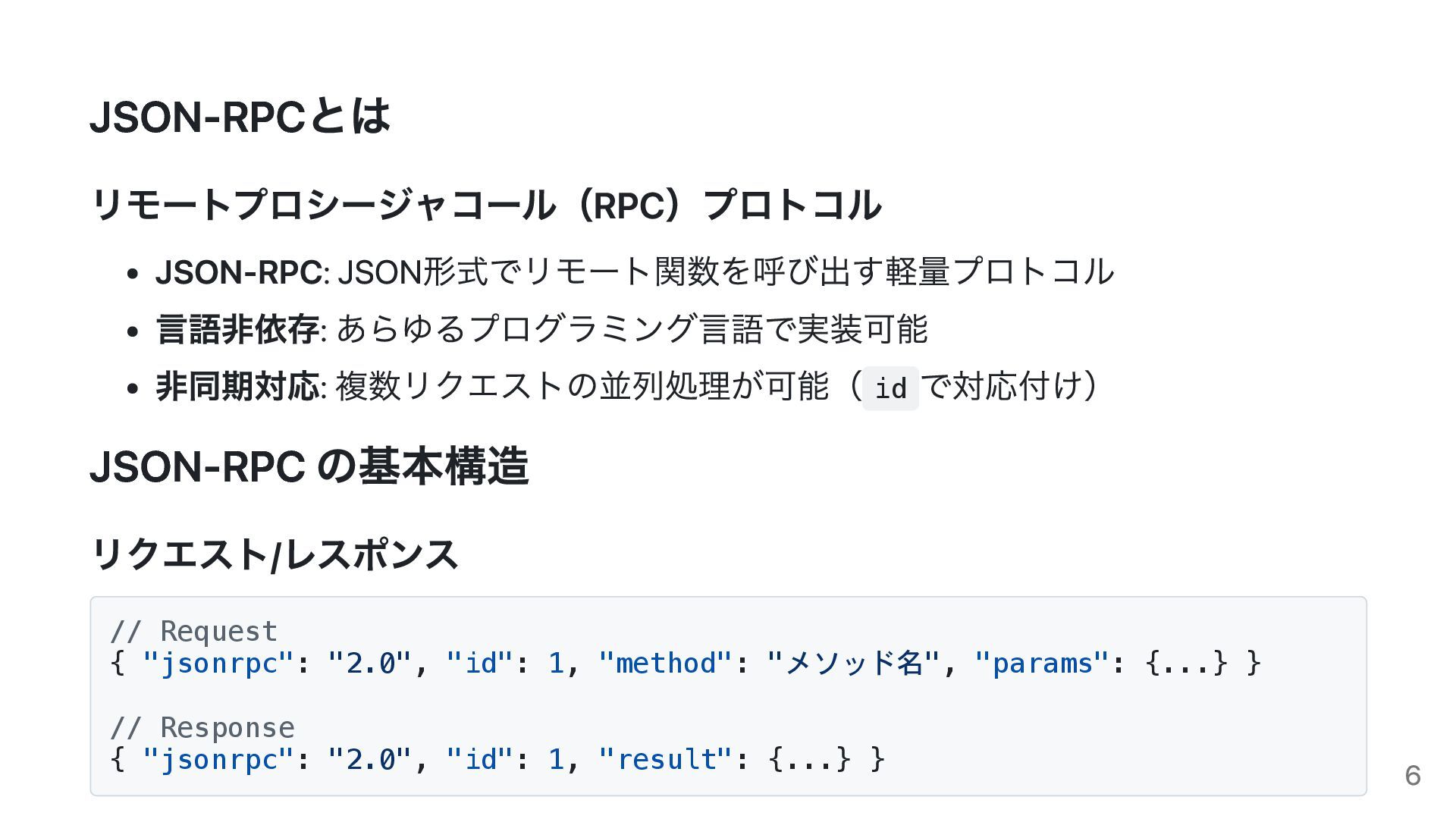
JSON-RPCとは リモートプロシージャコール(RPC)プロトコル JSON-RPC: JSON形式でリモート関数を呼び出す軽量プロトコル 言語非依存: あらゆるプログラミング言語で実装可能 非同期対応: 複数リクエストの並列処理が可能( id で対応付け)
JSON-RPC の基本構造 リクエスト/レスポンス // Request { "jsonrpc": "2.0", "id": 1, "method": "メソッド名", "params": {...} } // Response { "jsonrpc": "2.0", "id": 1, "result": {...} } 6
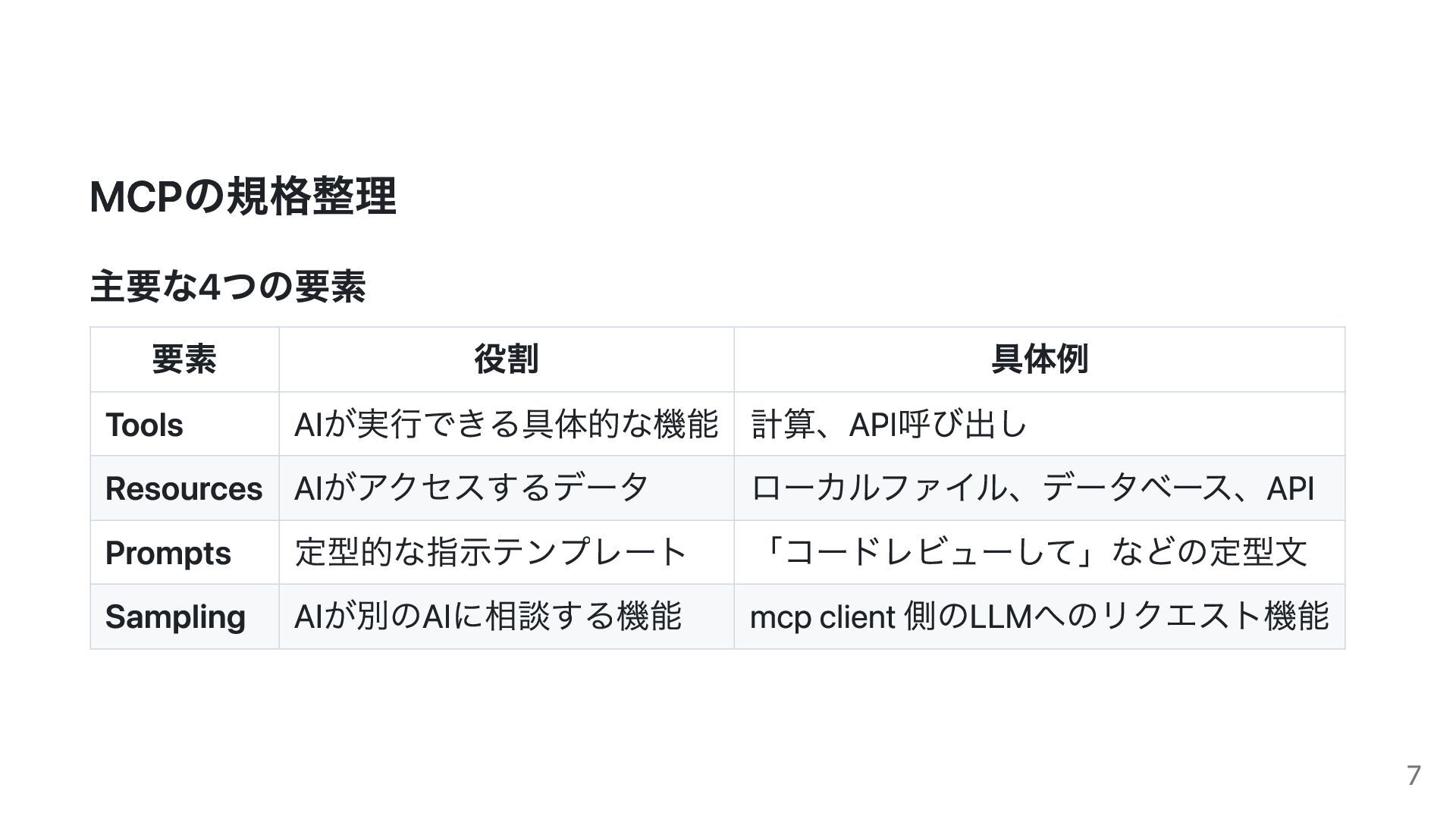
MCPの規格整理 主要な4つの要素 要素 役割 具体例 Tools AIが実行できる具体的な機能 計算、API呼び出し Resources AIがアクセスするデータ
ローカルファイル、データベース、API Prompts 定型的な指示テンプレート 「コードレビューして」などの定型文 Sampling AIが別のAIに相談する機能 mcp client 側のLLMへのリクエスト機能 7
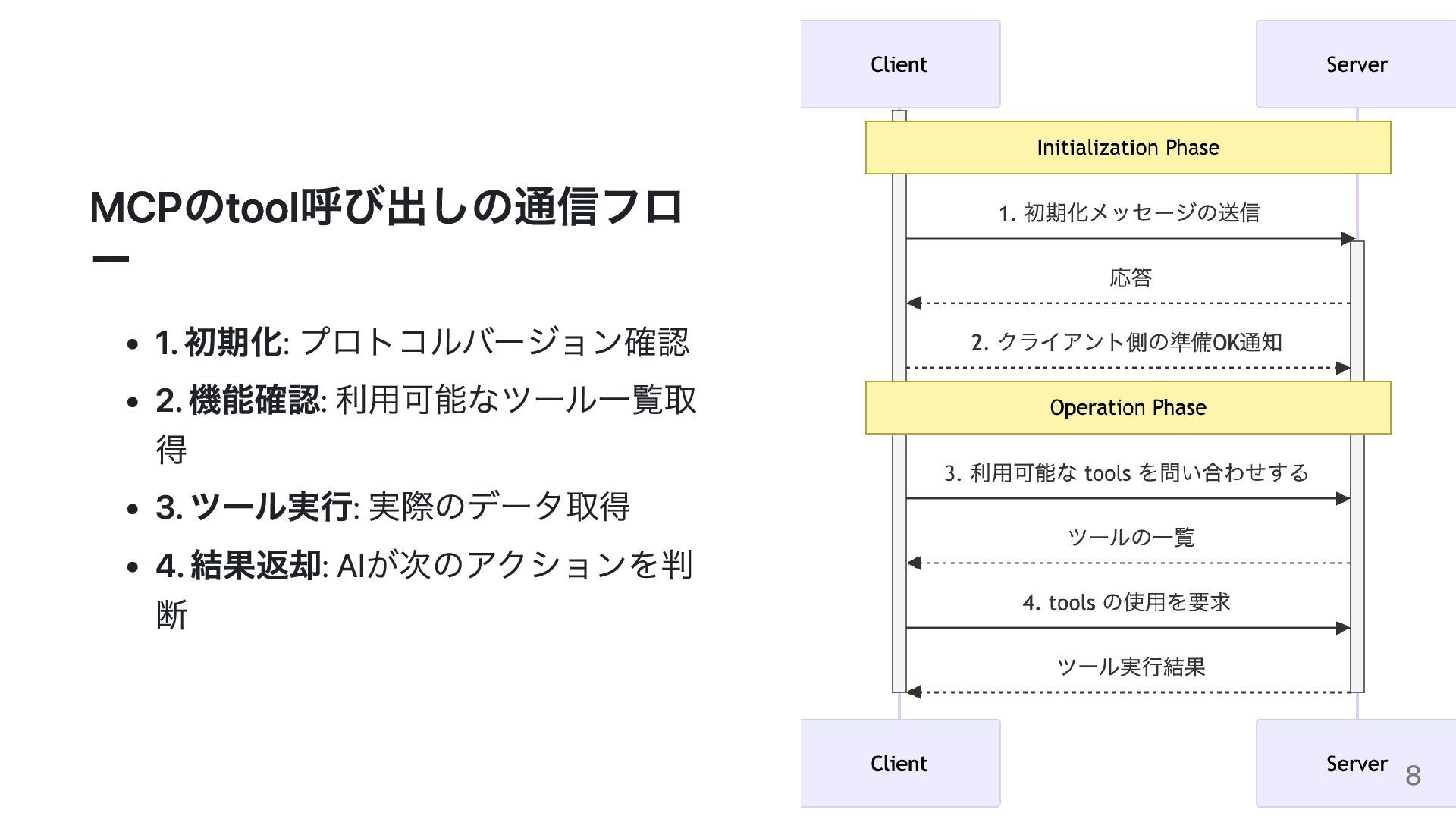
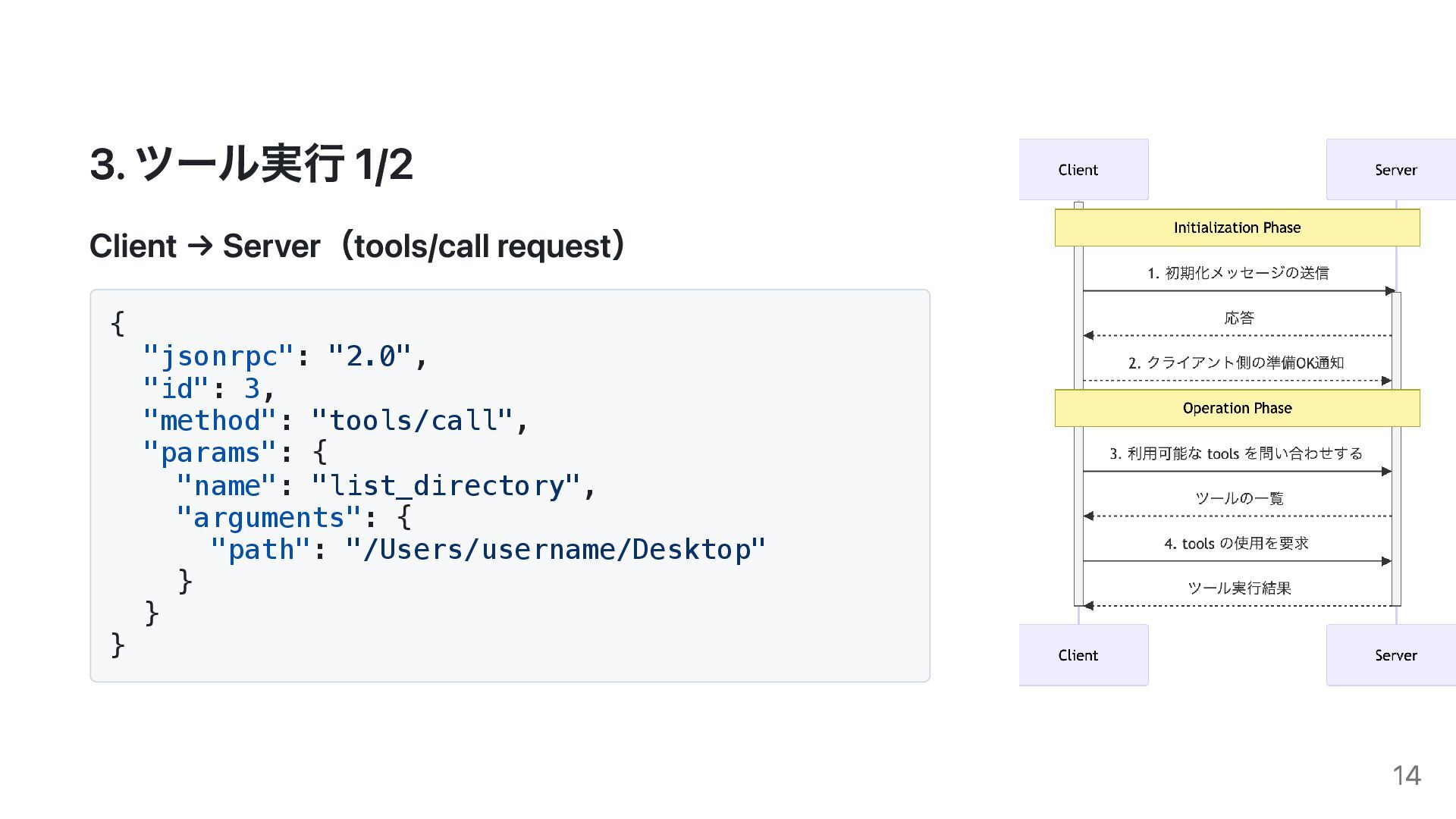
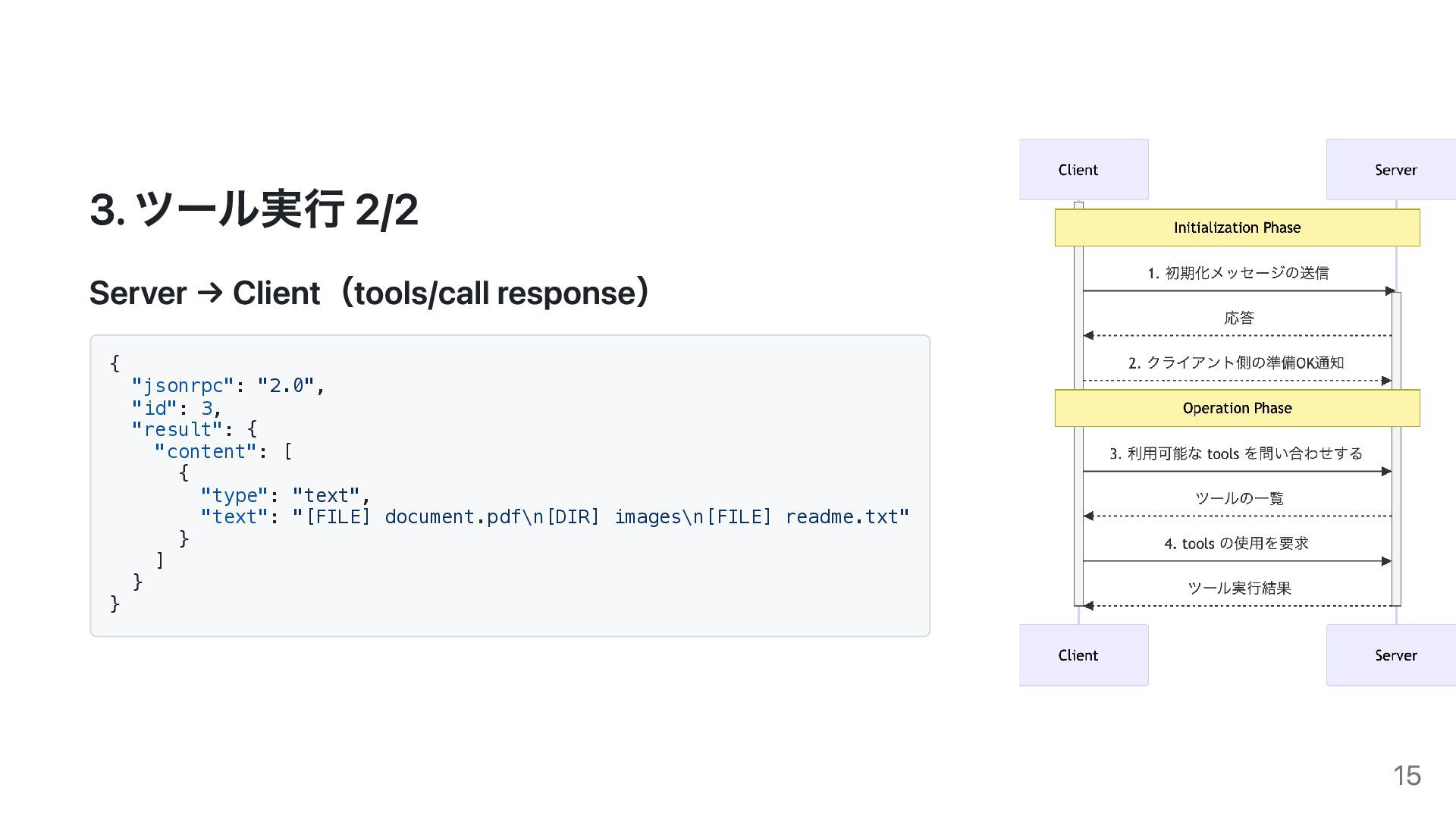
MCPのtool呼び出しの通信フロ ー 1. 初期化: プロトコルバージョン確認 2. 機能確認: 利用可能なツール一覧取 得 3.
ツール実行: 実際のデータ取得 4. 結果返却: AIが次のアクションを判 断 8
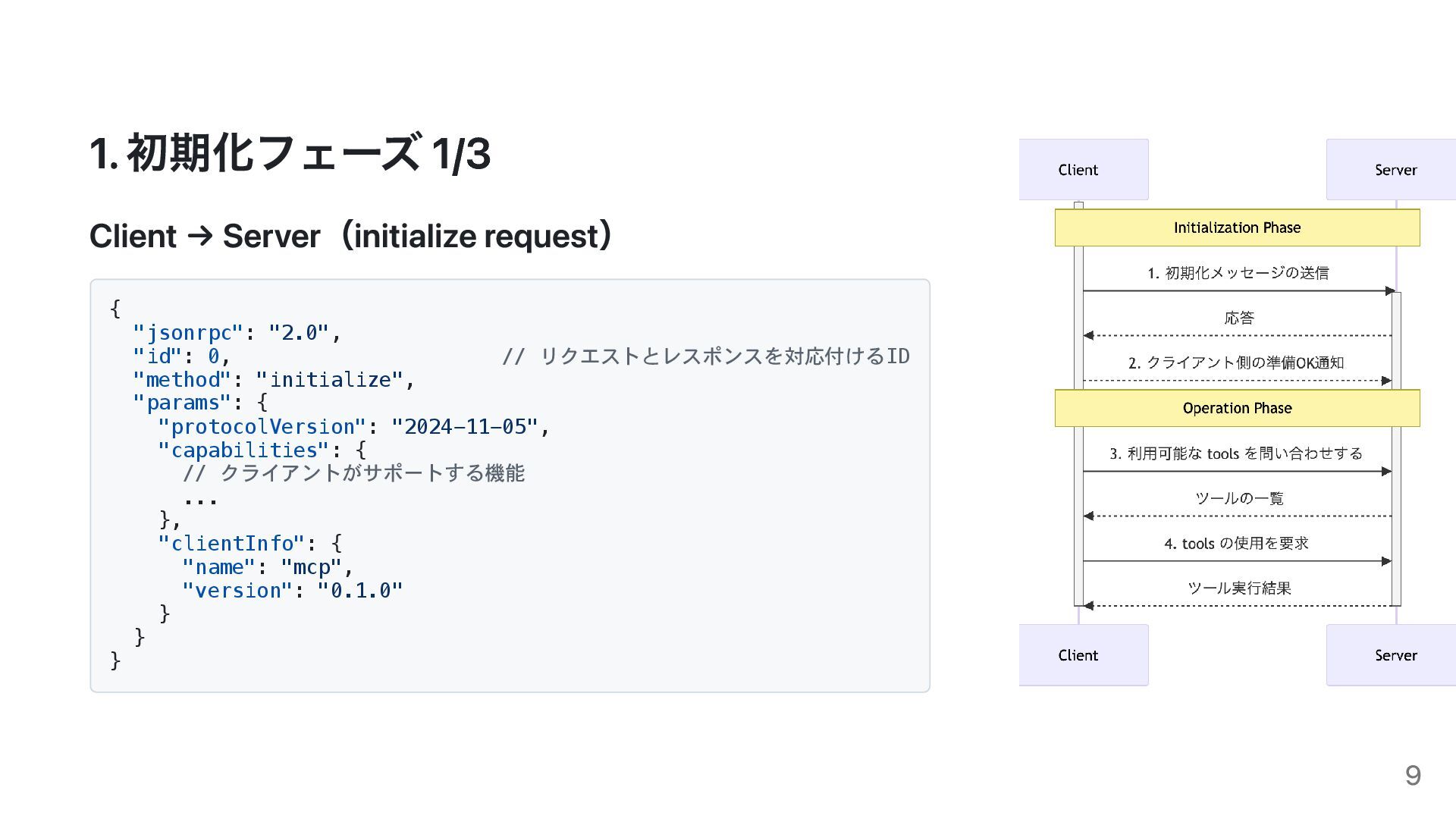
1. 初期化フェーズ 1/3 Client → Server(initialize request) { "jsonrpc": "2.0",
"id": 0, // リクエストとレスポンスを対応付けるID "method": "initialize", "params": { "protocolVersion": "2024-11-05", "capabilities": { // クライアントがサポートする機能 ... }, "clientInfo": { "name": "mcp", "version": "0.1.0" } } } 9
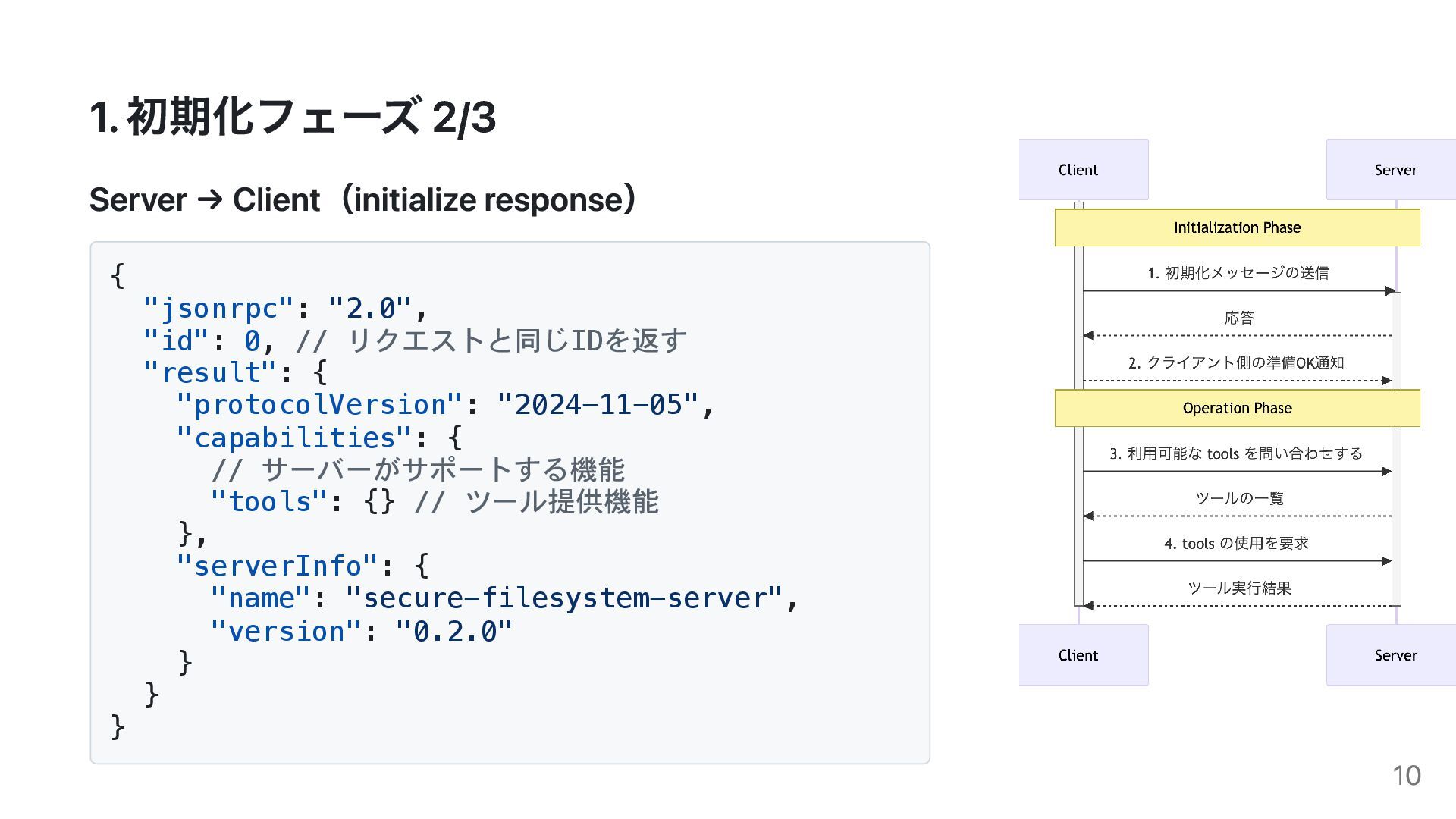
1. 初期化フェーズ 2/3 Server → Client(initialize response) { "jsonrpc": "2.0",
"id": 0, // リクエストと同じIDを返す "result": { "protocolVersion": "2024-11-05", "capabilities": { // サーバーがサポートする機能 "tools": {} // ツール提供機能 }, "serverInfo": { "name": "secure-filesystem-server", "version": "0.2.0" } } } 10
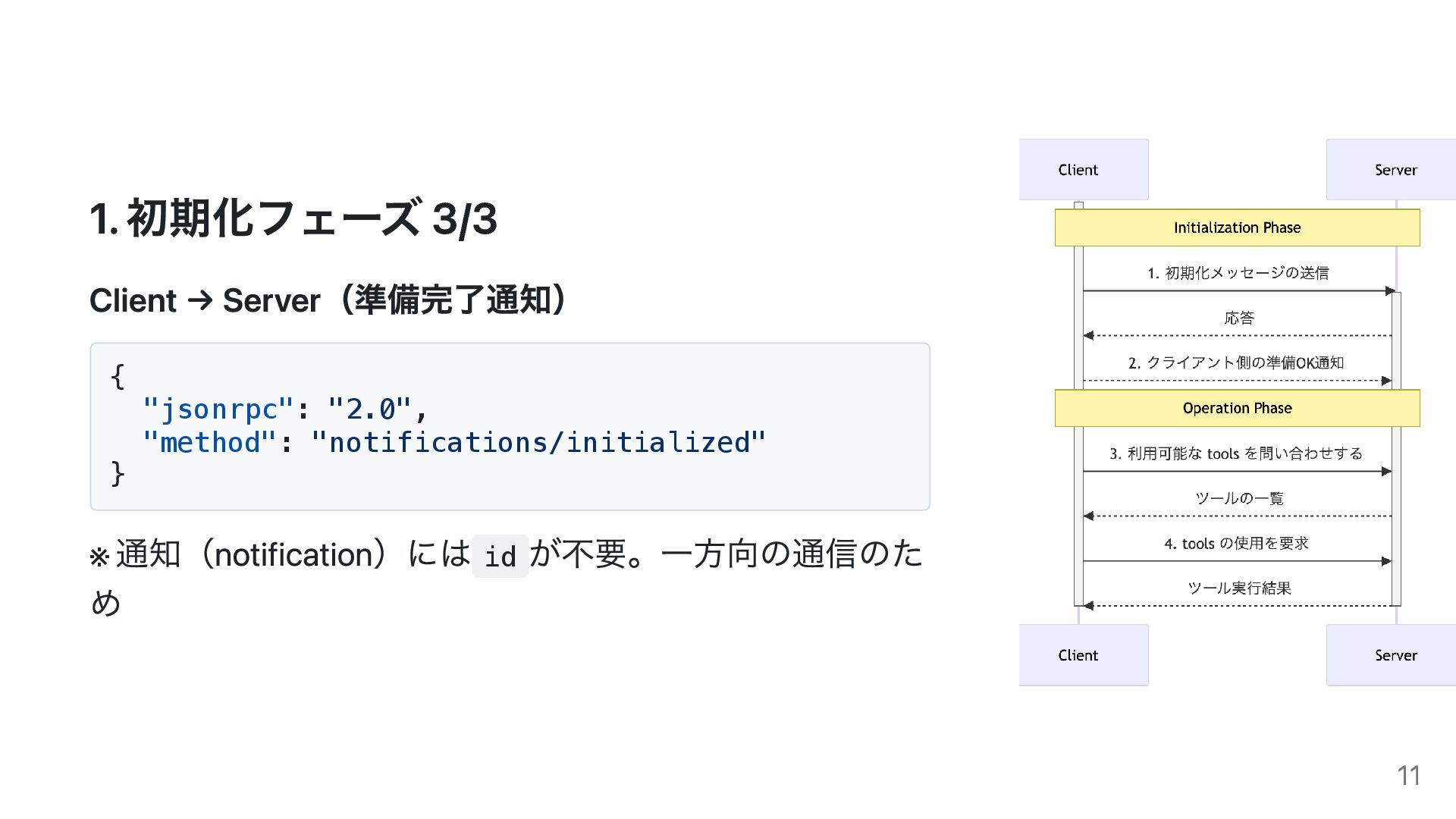
1. 初期化フェーズ 3/3 Client → Server(準備完了通知) { "jsonrpc": "2.0", "method":
"notifications/initialized" } ※ 通知(notification)には id が不要。一方向の通信のた め 11
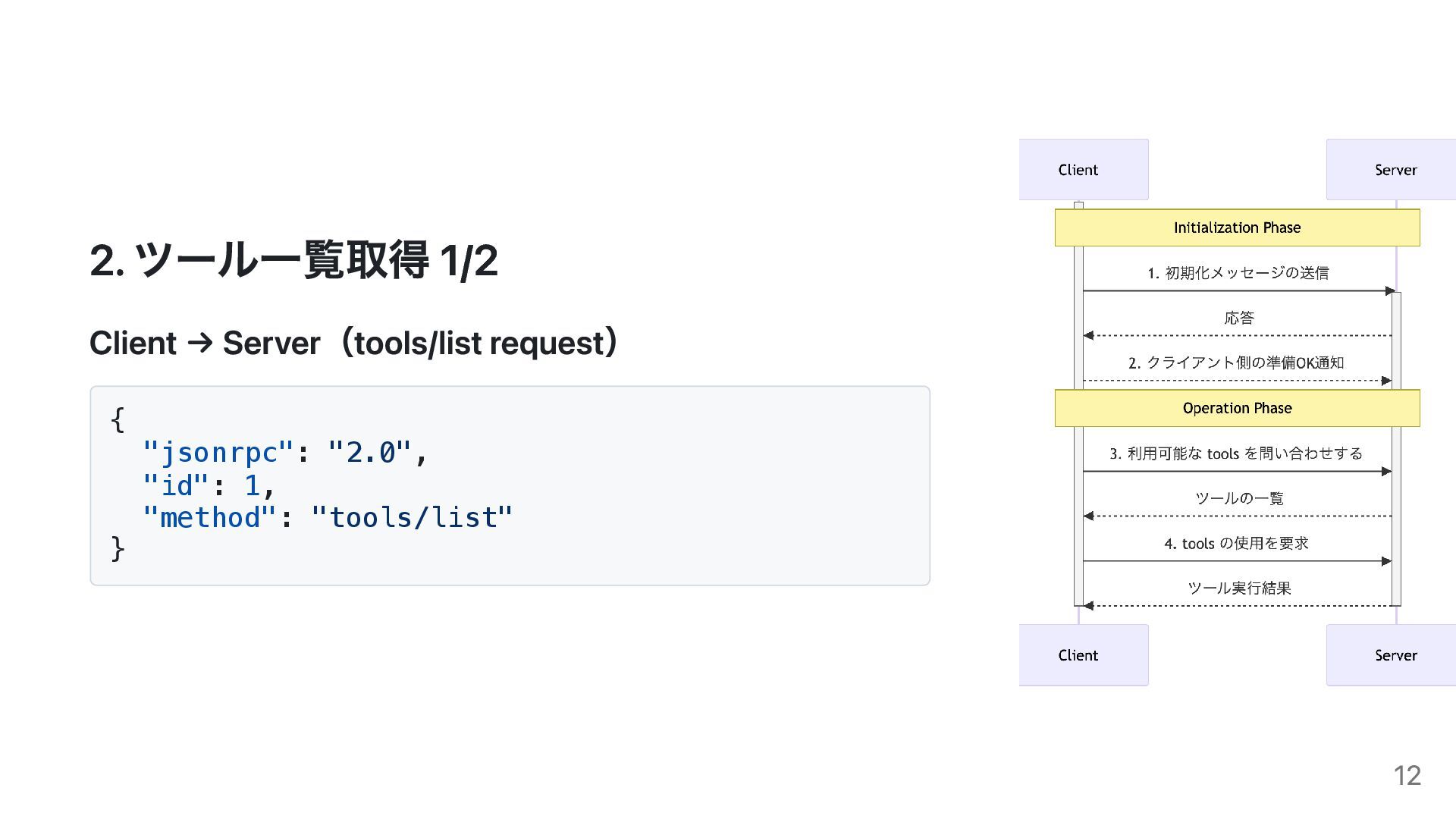
2. ツール一覧取得 1/2 Client → Server(tools/list request) { "jsonrpc": "2.0",
"id": 1, "method": "tools/list" } 12
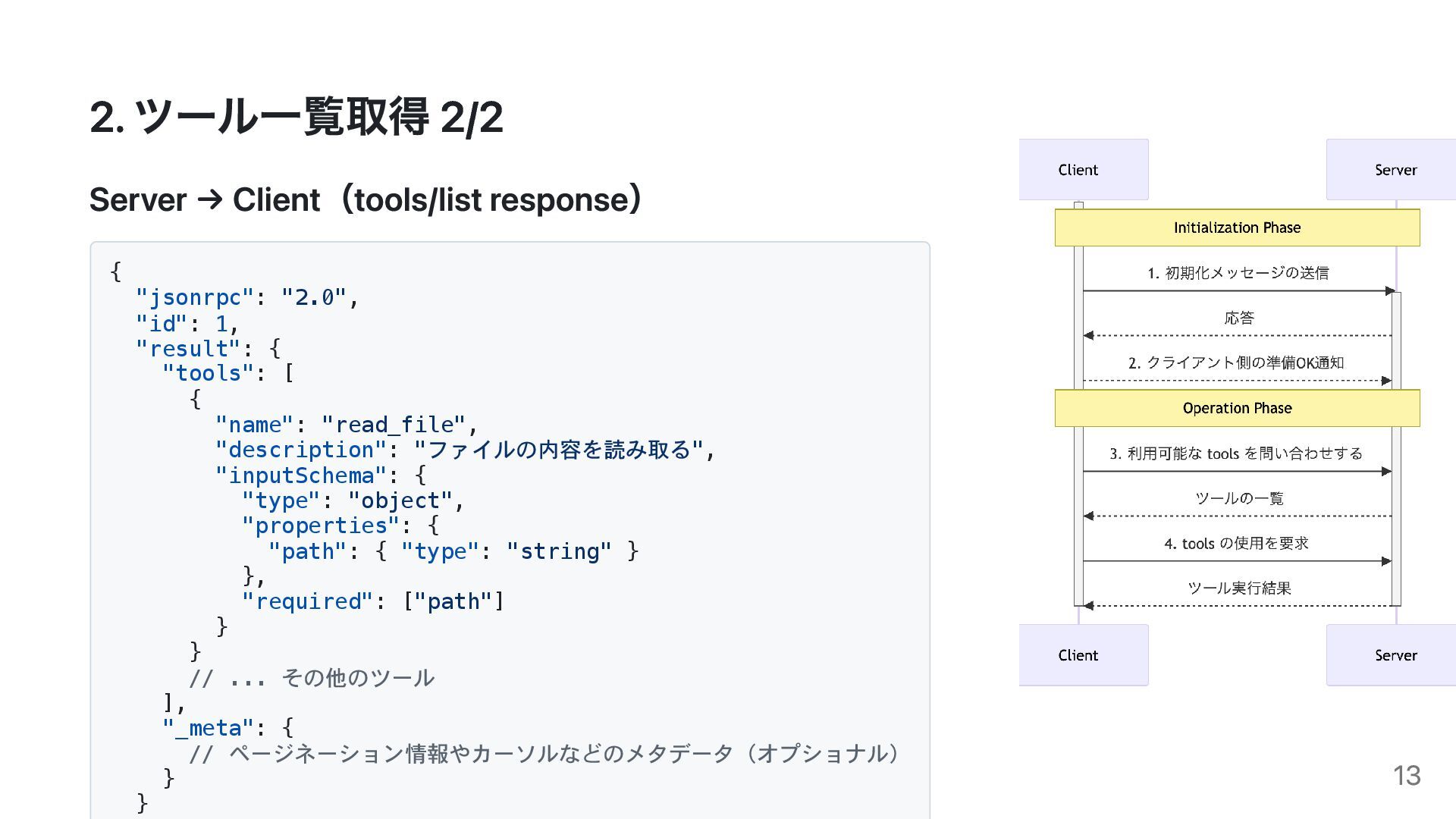
2. ツール一覧取得 2/2 Server → Client(tools/list response) { "jsonrpc": "2.0",
"id": 1, "result": { "tools": [ { "name": "read_file", "description": "ファイルの内容を読み取る", "inputSchema": { "type": "object", "properties": { "path": { "type": "string" } }, "required": ["path"] } } // ... その他のツール ], "_meta": { // ページネーション情報やカーソルなどのメタデータ(オプショナル) } } 13
3. ツール実行 1/2 Client → Server(tools/call request) { "jsonrpc": "2.0",
"id": 3, "method": "tools/call", "params": { "name": "list_directory", "arguments": { "path": "/Users/username/Desktop" } } } 14
3. ツール実行 2/2 Server → Client(tools/call response) { "jsonrpc": "2.0",
"id": 3, "result": { "content": [ { "type": "text", "text": "[FILE] document.pdf\n[DIR] images\n[FILE] readme.txt" } ] } } 15
Apps SDK について 16
Apps SDKとは ChatGPT Apps SDK の概要 提供元: OpenAI 公開日: 2025年10月6日(OpenAI
DevDay 2025で発 表) 利用可能プラン: Pro プラン対応 17
Apps SDK 公式サンプル 0:00 18
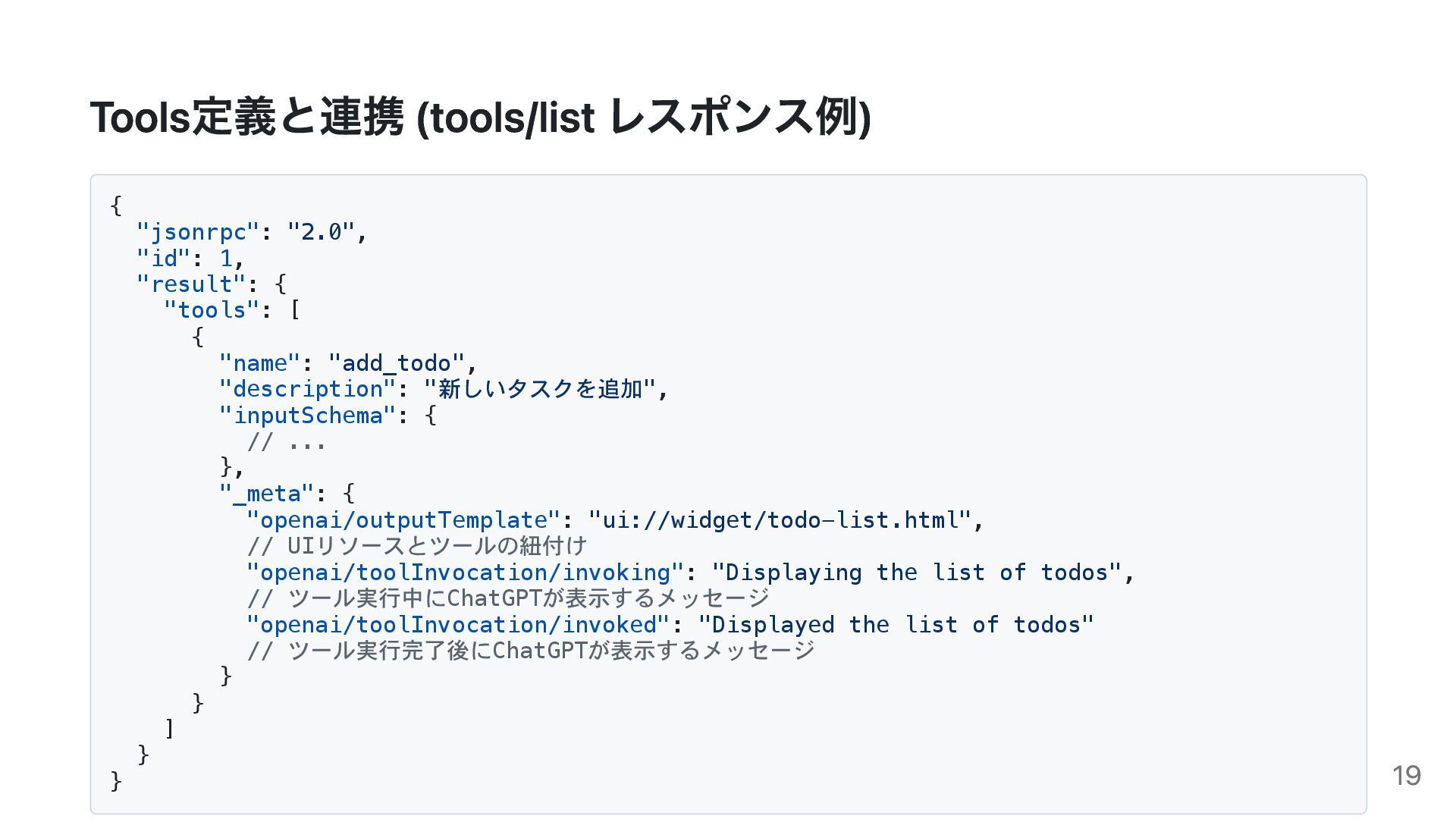
Tools定義と連携 (tools/list レスポンス例) { "jsonrpc": "2.0", "id": 1, "result": {
"tools": [ { "name": "add_todo", "description": "新しいタスクを追加", "inputSchema": { // ... }, "_meta": { "openai/outputTemplate": "ui://widget/todo-list.html", // UIリソースとツールの紐付け "openai/toolInvocation/invoking": "Displaying the list of todos", // ツール実行中にChatGPTが表示するメッセージ "openai/toolInvocation/invoked": "Displayed the list of todos" // ツール実行完了後にChatGPTが表示するメッセージ } } ] } } 19
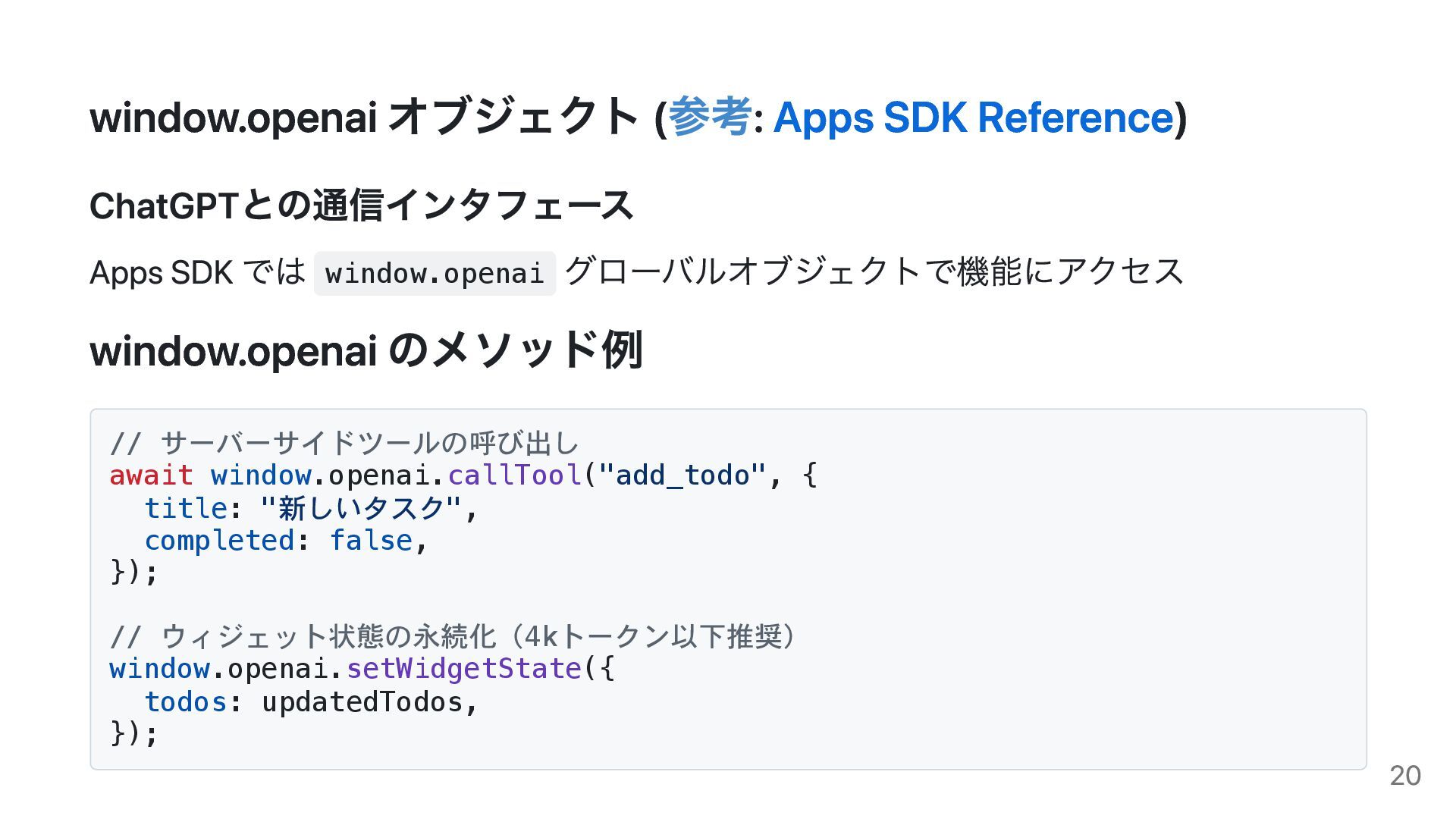
window.openai オブジェクト (参考: Apps SDK Reference) ChatGPTとの通信インタフェース Apps SDK では
window.openai グローバルオブジェクトで機能にアクセス window.openai のメソッド例 // サーバーサイドツールの呼び出し await window.openai.callTool("add_todo", { title: "新しいタスク", completed: false, }); // ウィジェット状態の永続化(4kトークン以下推奨) window.openai.setWidgetState({ todos: updatedTodos, }); 20
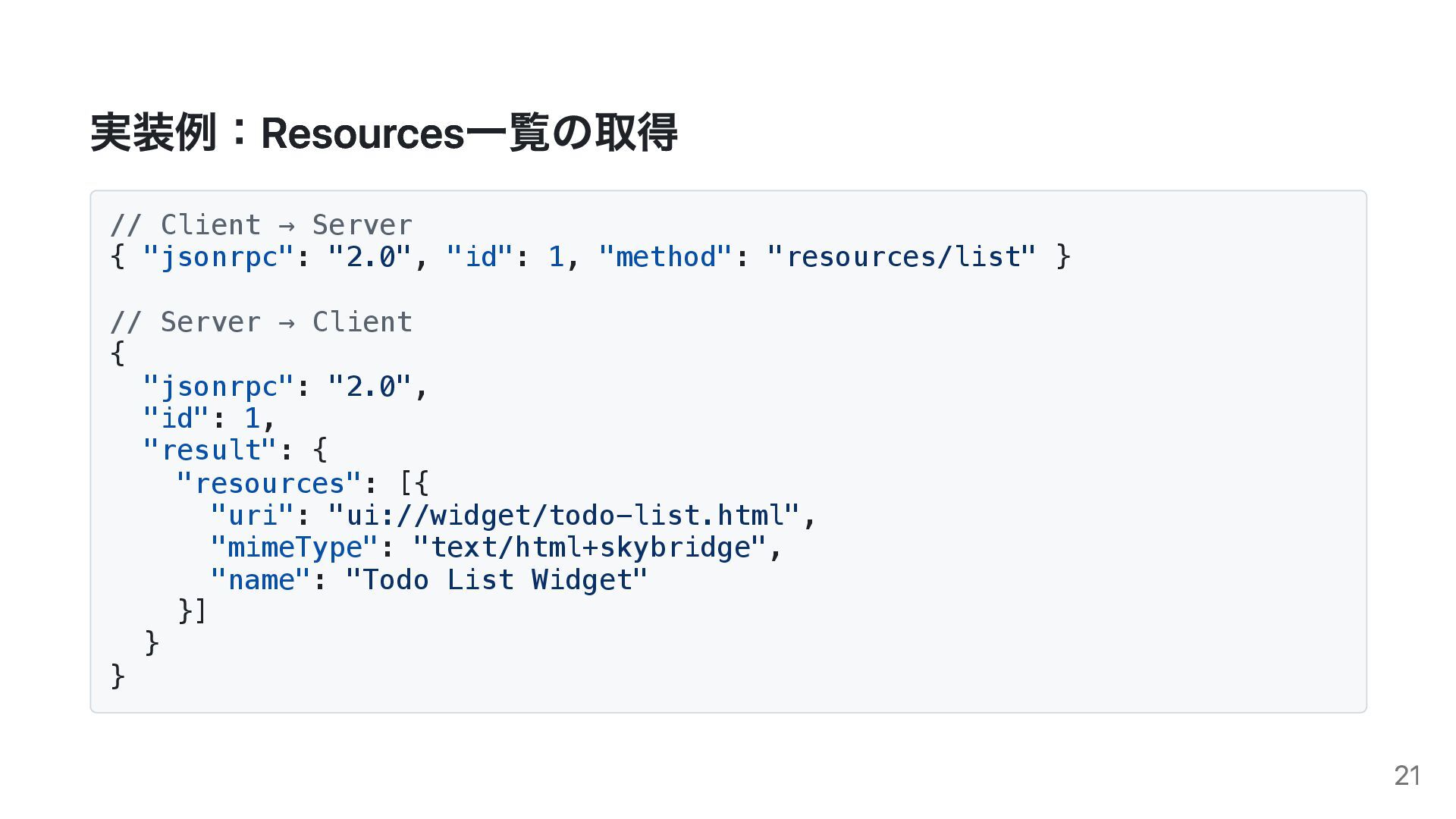
実装例:Resources一覧の取得 // Client → Server { "jsonrpc": "2.0", "id": 1,
"method": "resources/list" } // Server → Client { "jsonrpc": "2.0", "id": 1, "result": { "resources": [{ "uri": "ui://widget/todo-list.html", "mimeType": "text/html+skybridge", "name": "Todo List Widget" }] } } 21
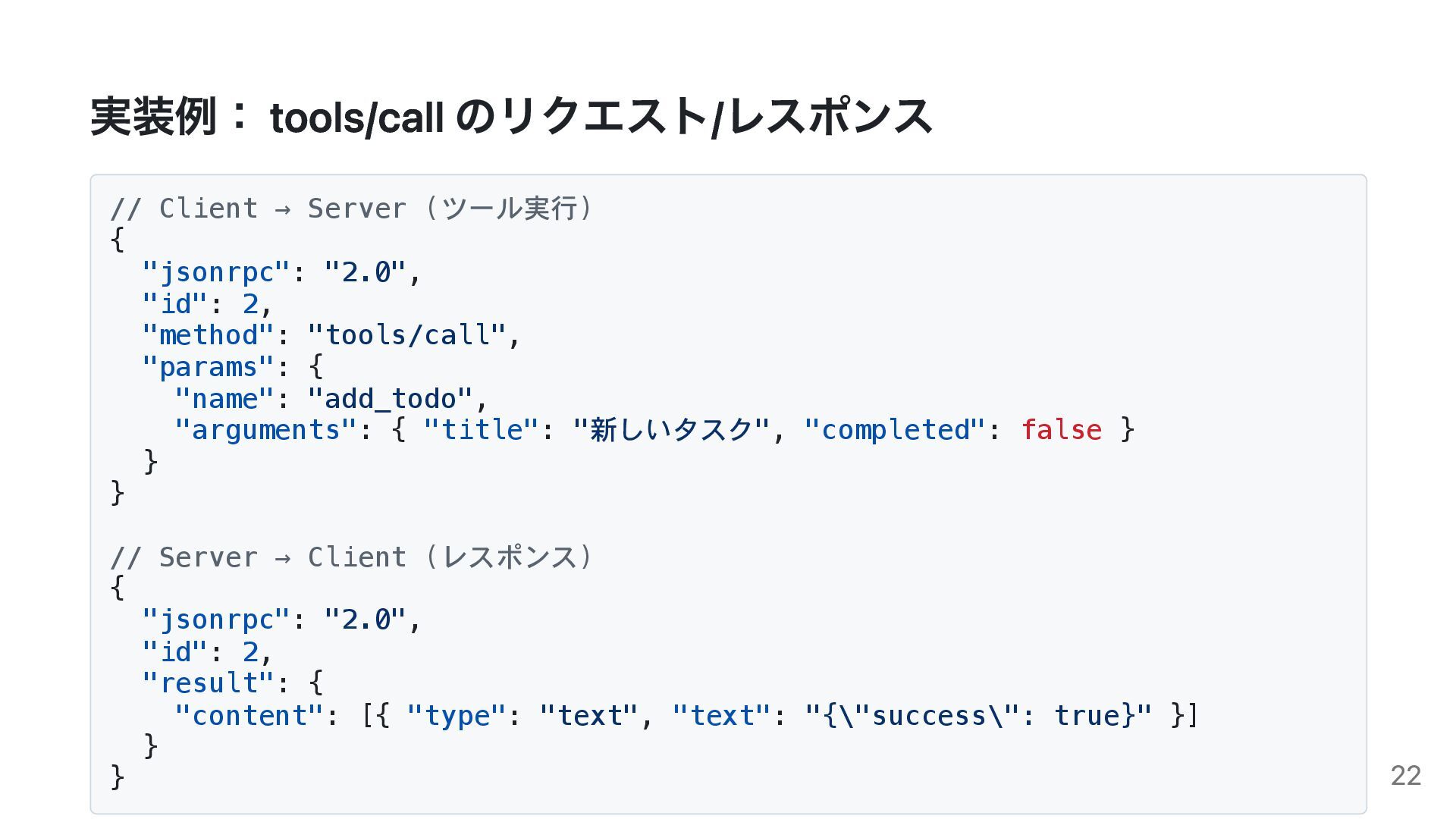
実装例: tools/call のリクエスト/レスポンス // Client → Server (ツール実行) { "jsonrpc":
"2.0", "id": 2, "method": "tools/call", "params": { "name": "add_todo", "arguments": { "title": "新しいタスク", "completed": false } } } // Server → Client (レスポンス) { "jsonrpc": "2.0", "id": 2, "result": { "content": [{ "type": "text", "text": "{\"success\": true}" }] } } 22
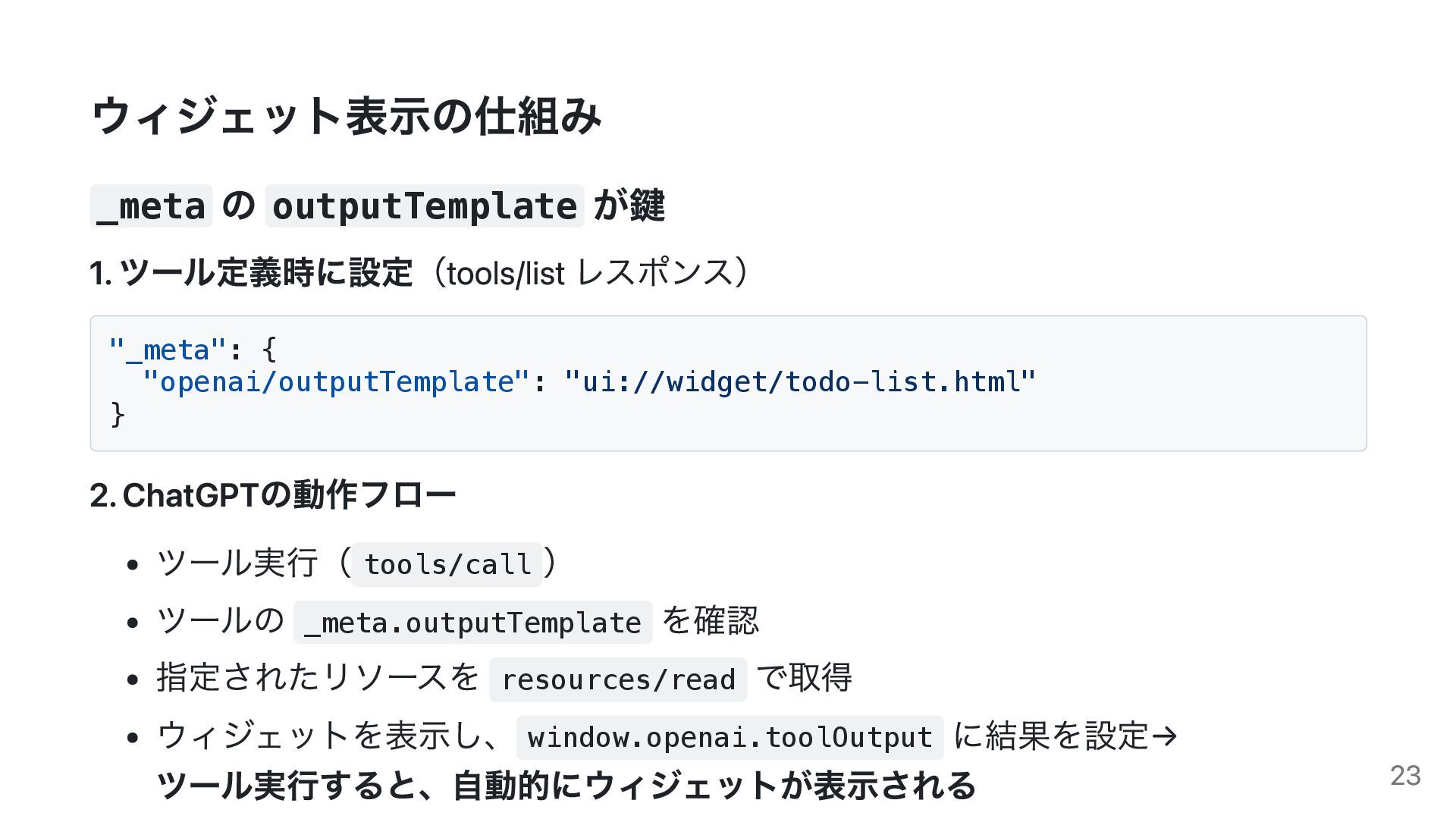
ウィジェット表示の仕組み _meta の outputTemplate が鍵 1. ツール定義時に設定(tools/list レスポンス) "_meta": {
"openai/outputTemplate": "ui://widget/todo-list.html" } 2. ChatGPTの動作フロー ツール実行( tools/call ) ツールの _meta.outputTemplate を確認 指定されたリソースを resources/read で取得 ウィジェットを表示し、 window.openai.toolOutput に結果を設定→ ツール実行すると、自動的にウィジェットが表示される 23
Apps SDK で遊んでみた Coharu VRM 0:00 24
Coharu Apps SDK連携 カスタムウィジェット実装例 0:00 25
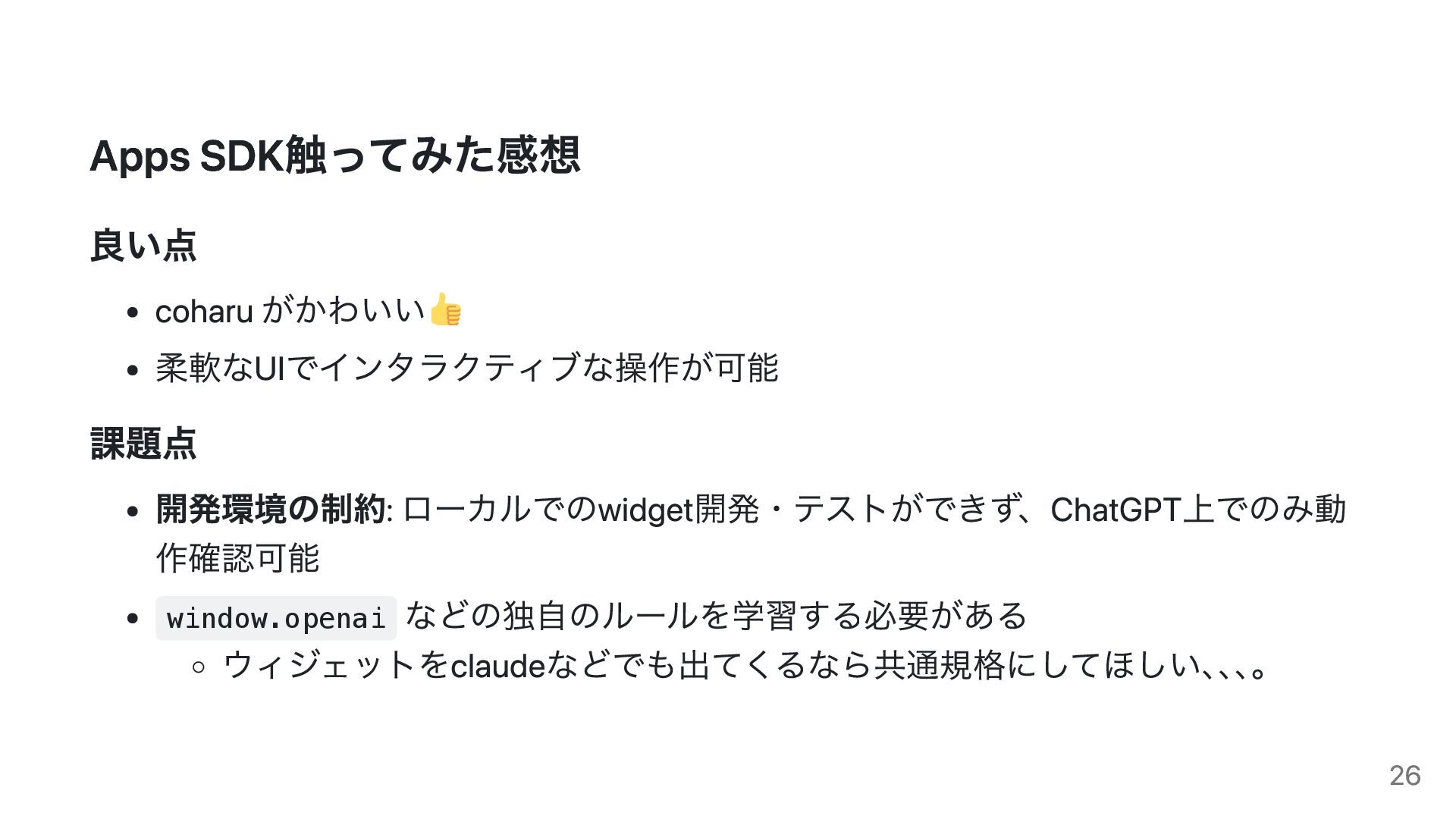
Apps SDK触ってみた感想 良い点 coharu がかわいい 柔軟なUIでインタラクティブな操作が可能 課題点 開発環境の制約: ローカルでのwidget開発・テストができず、ChatGPT上でのみ動 作確認可能
window.openai などの独自のルールを学習する必要がある ウィジェットをclaudeなどでも出てくるなら共通規格にしてほしい、 、 、 。 26
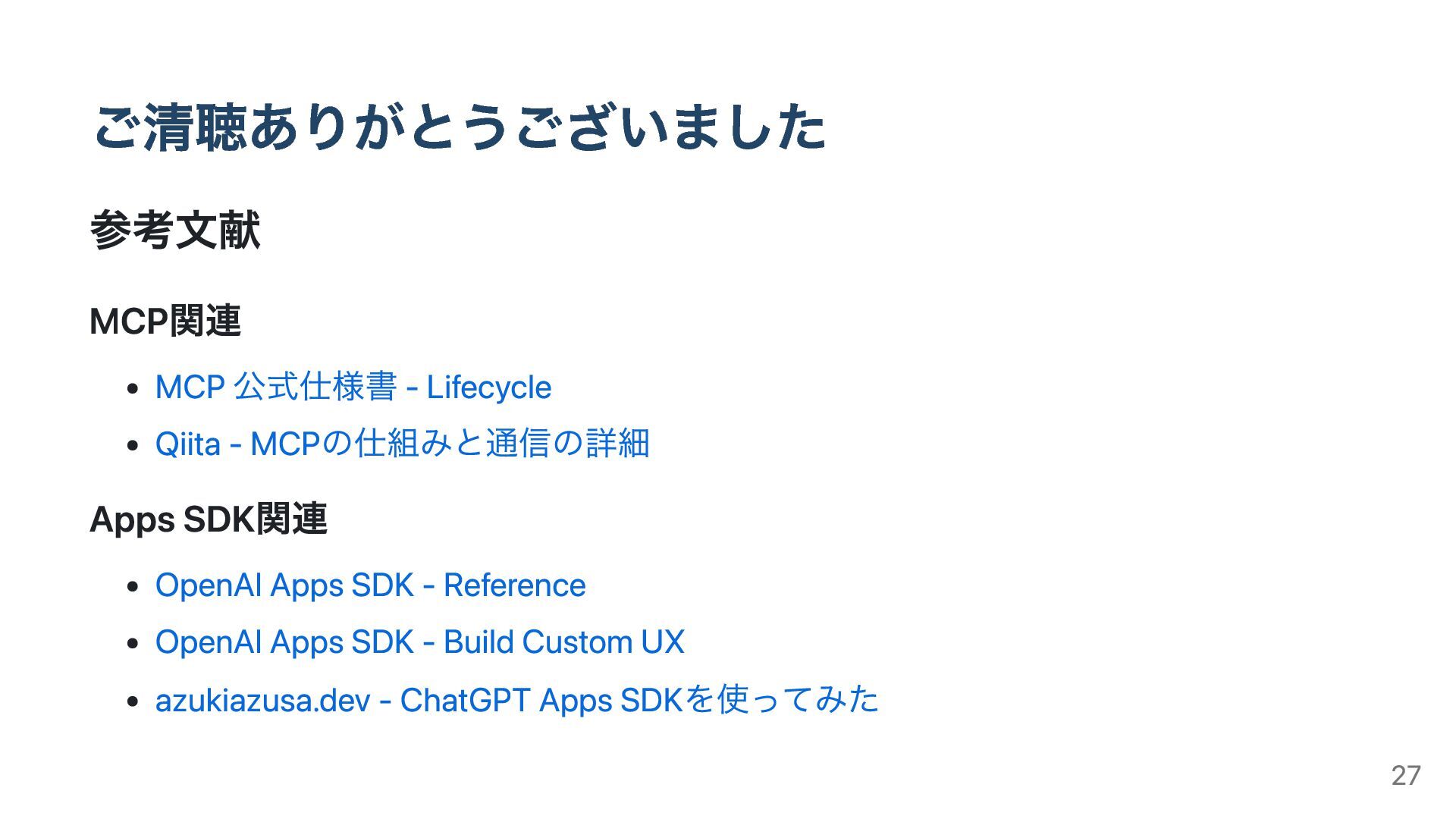
ご清聴ありがとうございました 参考文献 MCP関連 MCP 公式仕様書 - Lifecycle Qiita - MCPの仕組みと通信の詳細
Apps SDK関連 OpenAI Apps SDK - Reference OpenAI Apps SDK - Build Custom UX azukiazusa.dev - ChatGPT Apps SDKを使ってみた 27
28


 hisuzuya
 yuukiyo
 myohei
.jpg) lamaglama39
lamaglama39
 yama3133
 emiki
emiki
 kintotechdev
 kworkdev
 neohsu
 tsukuboshi
 konifar
 subroh0508
 happysamurai294
 hatefulcrawdad
 coloredviolet
 mlcsv
mlcsv
 techseoconnect
 ryanjones
 marktimemedia
 davidcarrasco
 tmiket
 varn
varn
 helmedeiros
 palkan
 bcantrill