Upgrade to Pro
— share decks privately, control downloads, hide ads and more …
Speaker Deck
Sign up for free
Menu
Search
Features
All features
Private URLs
Password Protection
Custom URLS
Scheduled publishing
Remove Branding
Restrict embedding
Deck Collections
Notes
Features
All features
Private URLs
Password Protection
Custom URLS
Scheduled publishing
Remove Branding
Restrict embedding
Deck Collections
Notes
Explore
Featured decks
Featured speakers
Programming
Technology
Storyboards
Explore
Featured decks
Featured speakers
Programming
Technology
Storyboards
Pricing
Search
Sign in
Sign up for free
Linuxのディレクトリ構造の話
Search
Osumi, Yusuke
August 21, 2020
Technology
920
0
Share
Embed
Copy iframe code
Copy JS code
Copy link
Start on current slide
Linuxのディレクトリ構造の話
「新しいLinuxの教科書」を読む会 オンライン #4 での発表資料です。
https://linuxbook.connpass.com/event/184754/
Osumi, Yusuke
August 21, 2020
More Decks by Osumi, Yusuke
See All by Osumi, Yusuke
本の紹介の補足
ozuma
1
430
gitサービス3兄弟
ozuma
0
430
簡体字は楽
ozuma
0
510
ソフトウェアは固定資産
ozuma
0
450
ASCIIコードの小話
ozuma
0
480
今いるディレクトリを消すとどうなる
ozuma
1
440
名前付きパイプ FIFO
ozuma
0
590
文章、作文技法 リモートワーク
ozuma
1
950
CentOSの今後のリリース(簡易説明)
ozuma
0
430
Other Decks in Technology
See All in Technology
CTO Night|NotionのAIエージェントとFDE
kzkhykw1991
0
170
Local CI × GitHub Actions
gogutan
2
220
Gemini Intelligence 入門 ― AppFunctions と Gemini Nano
takuroabe
0
280
スプシの手作業からの解脱 ~更新はClaude Codeに、見せ方と使い方はGASアプリに任せる~
kentarofujii
0
150
USB PDを使ってスマホを労わりたい
raspython3
0
180
DevelopersIO 2026 知識の地図を描く ─ オントロジーとは何か?
ishikawa_satoru
1
1.7k
会社説明資料
persolserverworks
0
9.8k
実体験から学ぶ分析エージェントの開発と運⽤
recruitengineers
PRO
8
2.4k
DBについての基礎説明(MySQL編) - コロプラ 2026年度 新卒研修
colopl
0
100
Optunaの最新リリースv5.0について
pfn
PRO
0
120
スキマバイトという雇用形態は存在しないので、雇用期間1日のアルバイト契約を事業者とワーカーが結ぶ手続きを支えるのがタイミーなんです
akitoshiga
0
200
エンタメ企業のM&Aを支えるデータ基盤 ― 統合から店舗のリアルタイム分析まで / Data Engineering Summit 2026
genda
0
190
Featured
See All Featured
Breaking role norms: Why Content Design is so much more than writing copy - Taylor Woolridge
uxyall
1
450
What the history of the web can teach us about the future of AI
inesmontani
PRO
2
740
Unsuck your backbone
ammeep
672
58k
Deep Space Network (abreviated)
tonyrice
0
370
Measuring & Analyzing Core Web Vitals
bluesmoon
9
1k
The Limits of Empathy - UXLibs8
cassininazir
2
720
The B2B funnel & how to create a winning content strategy
katarinadahlin
PRO
1
570
Optimizing for Happiness
mojombo
378
71k
The World Runs on Bad Software
bkeepers
PRO
72
12k
Easily Structure & Communicate Ideas using Wireframe
afnizarnur
194
17k
Max Prin - Stacking Signals: How International SEO Comes Together (And Falls Apart)
techseoconnect
PRO
0
490
The Cult of Friendly URLs
andyhume
79
7k
Transcript
ちょっとだけ細かいLinuxの ディレクトリ構造の話 @ozuma5119 1 「新しいLinuxの教科書」を読む会 オンライン #4 2020/08/23
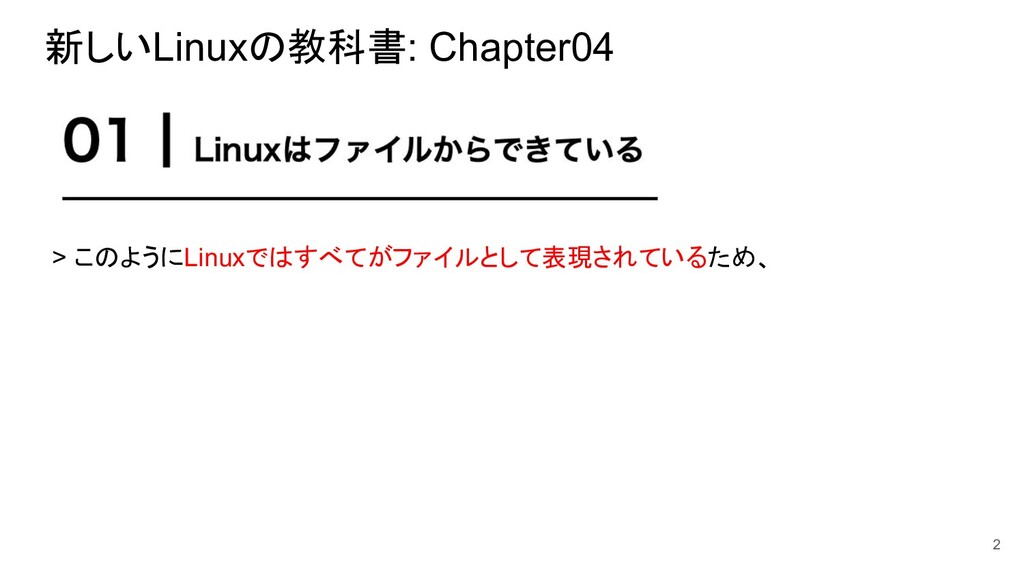
新しいLinuxの教科書: Chapter04 2 > このようにLinuxではすべてがファイルとして表現されているため、
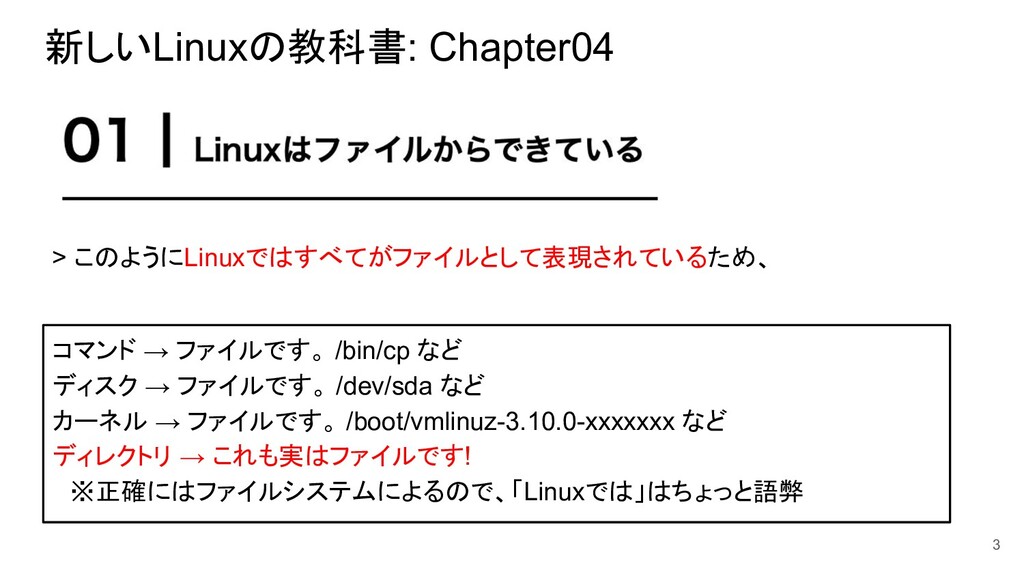
新しいLinuxの教科書: Chapter04 3 > このようにLinuxではすべてがファイルとして表現されているため、 コマンド → ファイルです。 /bin/cp など
ディスク → ファイルです。 /dev/sda など カーネル → ファイルです。 /boot/vmlinuz-3.10.0-xxxxxxx など ディレクトリ → これも実はファイルです! ※正確にはファイルシステムによるので、「Linuxでは」はちょっと語弊
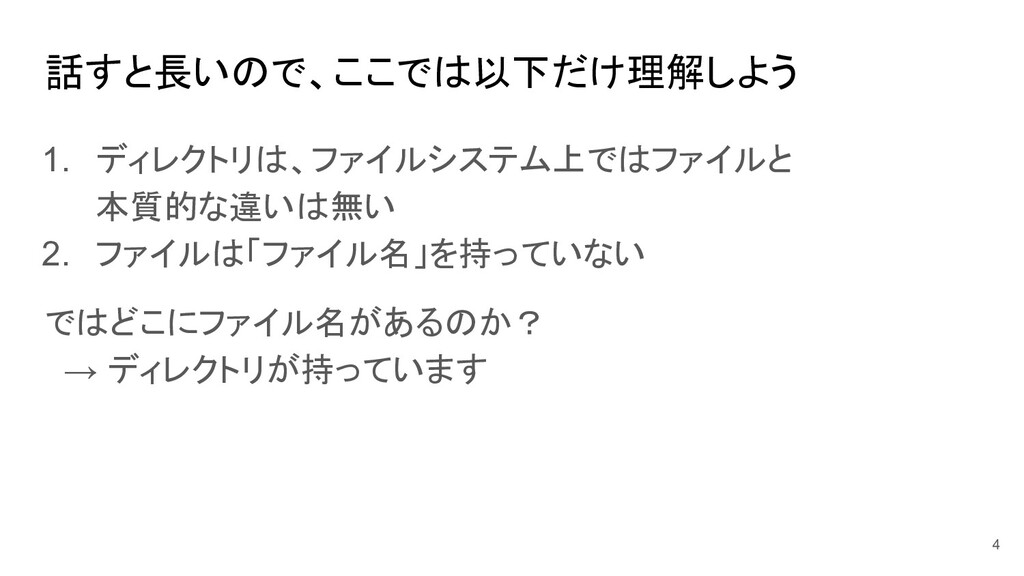
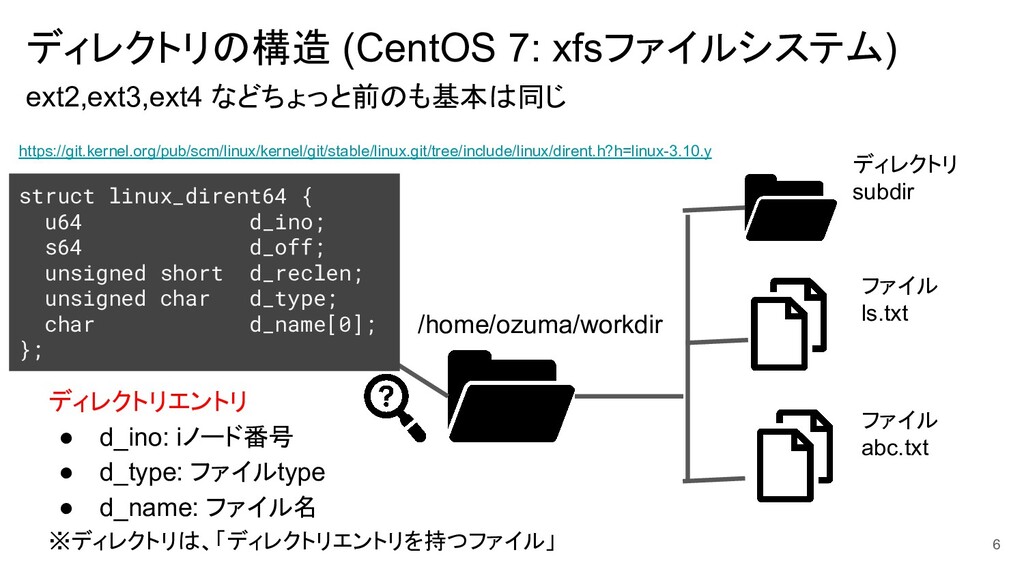
話すと長いので、ここでは以下だけ理解しよう 1. ディレクトリは、ファイルシステム上ではファイルと 本質的な違いは無い 2. ファイルは「ファイル名」を持っていない ではどこにファイル名があるのか? → ディレクトリが持っています 4
ディレクトリの構造 (CentOS 7: xfsファイルシステム) ext2,ext3,ext4 などちょっと前のも基本は同じ 5 ディレクトリ /home/ozuma/workdir ディレクトリ
subdir ファイル ls.txt ファイル abc.txt
ディレクトリの構造 (CentOS 7: xfsファイルシステム) ext2,ext3,ext4 などちょっと前のも基本は同じ 6 /home/ozuma/workdir ディレクトリ subdir
ファイル ls.txt ファイル abc.txt struct linux_dirent64 { u64 d_ino; s64 d_off; unsigned short d_reclen; unsigned char d_type; char d_name[0]; }; ディレクトリエントリ • d_ino: iノード番号 • d_type: ファイルtype • d_name: ファイル名 ※ディレクトリは、「ディレクトリエントリを持つファイル」 https://git.kernel.org/pub/scm/linux/kernel/git/stable/linux.git/tree/include/linux/dirent.h?h=linux-3.10.y
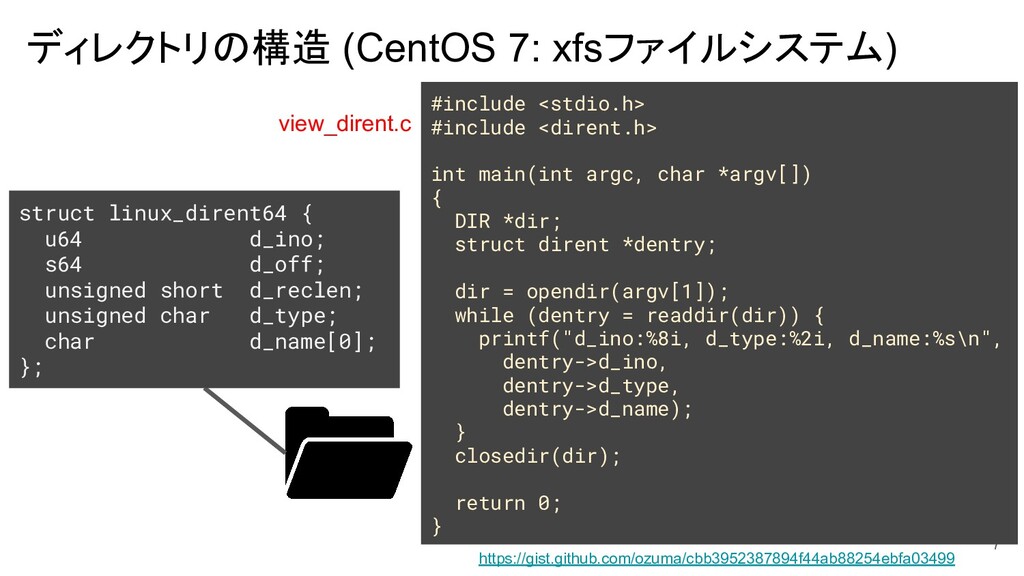
ディレクトリの構造 (CentOS 7: xfsファイルシステム) 7 #include <stdio.h> #include <dirent.h> int
main(int argc, char *argv[]) { DIR *dir; struct dirent *dentry; dir = opendir(argv[1]); while (dentry = readdir(dir)) { printf("d_ino:%8i, d_type:%2i, d_name:%s\n", dentry->d_ino, dentry->d_type, dentry->d_name); } closedir(dir); return 0; } struct linux_dirent64 { u64 d_ino; s64 d_off; unsigned short d_reclen; unsigned char d_type; char d_name[0]; }; https://gist.github.com/ozuma/cbb3952387894f44ab88254ebfa03499 view_dirent.c
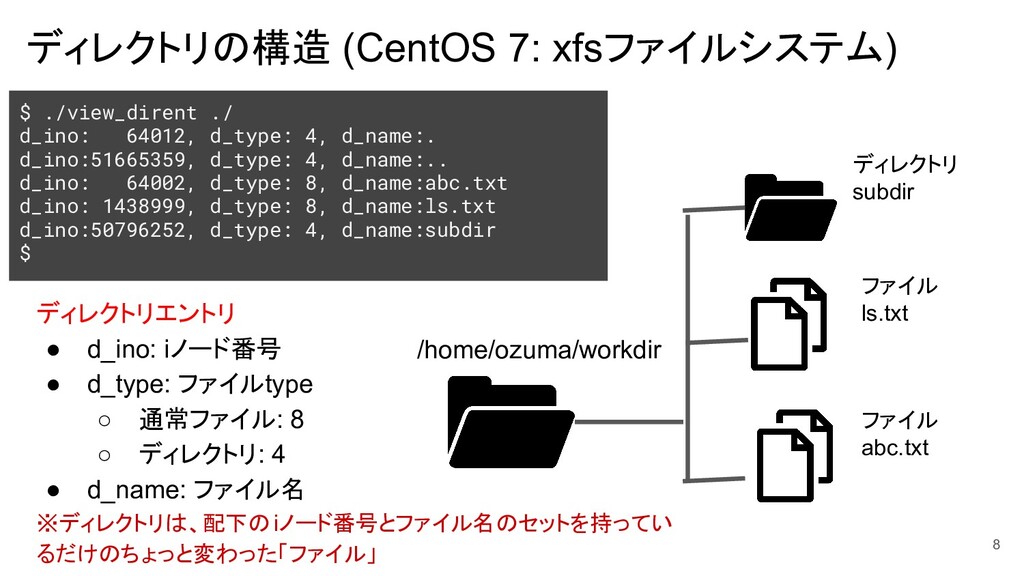
ディレクトリの構造 (CentOS 7: xfsファイルシステム) 8 /home/ozuma/workdir ディレクトリ subdir ファイル ls.txt
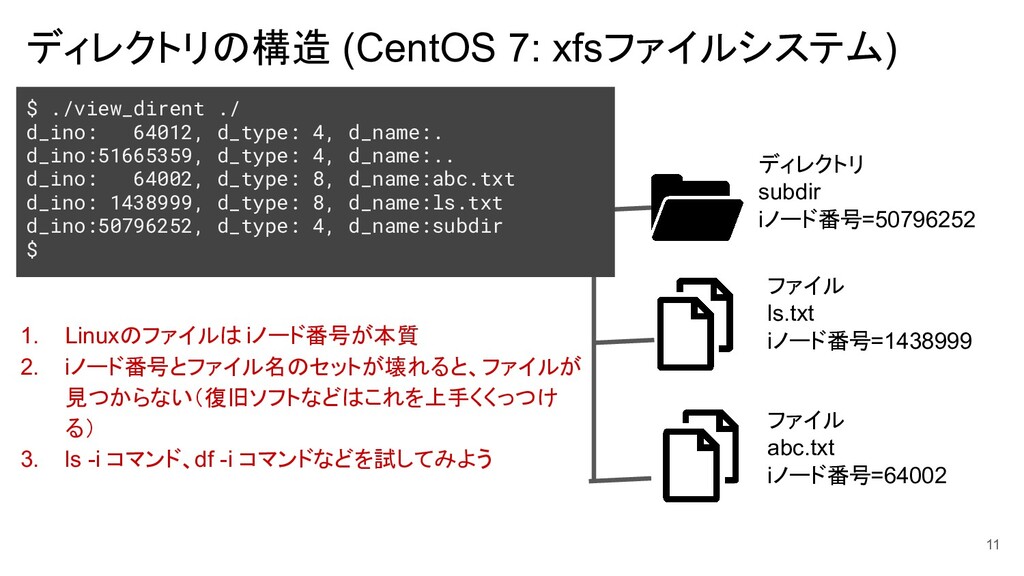
ファイル abc.txt ディレクトリエントリ • d_ino: iノード番号 • d_type: ファイルtype ◦ 通常ファイル: 8 ◦ ディレクトリ: 4 • d_name: ファイル名 ※ディレクトリは、配下の iノード番号とファイル名のセットを持ってい るだけのちょっと変わった「ファイル」 $ ./view_dirent ./ d_ino: 64012, d_type: 4, d_name:. d_ino:51665359, d_type: 4, d_name:.. d_ino: 64002, d_type: 8, d_name:abc.txt d_ino: 1438999, d_type: 8, d_name:ls.txt d_ino:50796252, d_type: 4, d_name:subdir $
新しいLinuxの教科書: Chapter04 9 > このようにLinuxではすべてがファイルとして表現されているため、
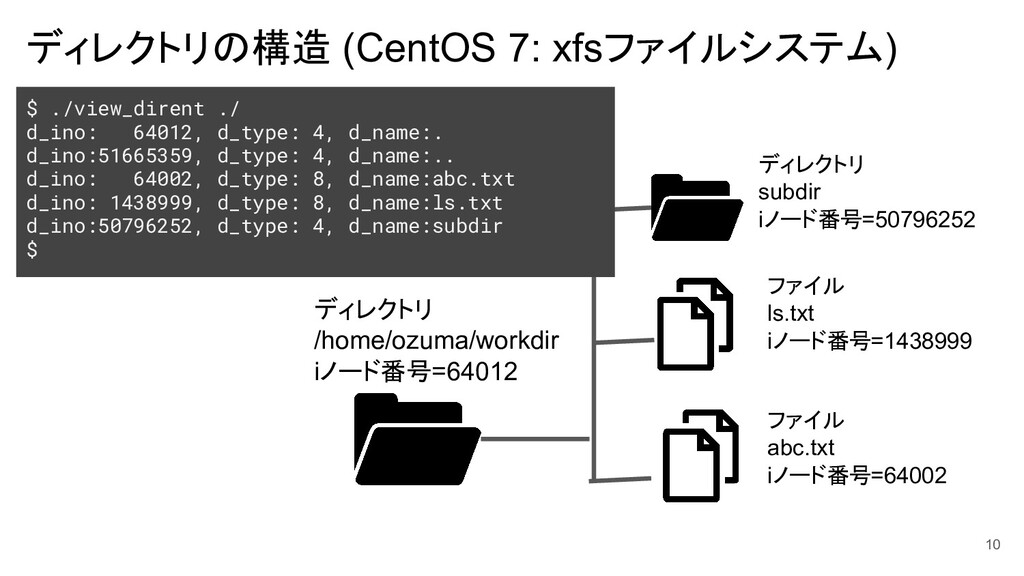
ディレクトリの構造 (CentOS 7: xfsファイルシステム) 10 ディレクトリ /home/ozuma/workdir iノード番号=64012 ディレクトリ subdir
iノード番号=50796252 ファイル ls.txt iノード番号=1438999 ファイル abc.txt iノード番号=64002 $ ./view_dirent ./ d_ino: 64012, d_type: 4, d_name:. d_ino:51665359, d_type: 4, d_name:.. d_ino: 64002, d_type: 8, d_name:abc.txt d_ino: 1438999, d_type: 8, d_name:ls.txt d_ino:50796252, d_type: 4, d_name:subdir $
ディレクトリの構造 (CentOS 7: xfsファイルシステム) 11 ディレクトリ subdir iノード番号=50796252 ファイル ls.txt
iノード番号=1438999 ファイル abc.txt iノード番号=64002 $ ./view_dirent ./ d_ino: 64012, d_type: 4, d_name:. d_ino:51665359, d_type: 4, d_name:.. d_ino: 64002, d_type: 8, d_name:abc.txt d_ino: 1438999, d_type: 8, d_name:ls.txt d_ino:50796252, d_type: 4, d_name:subdir $ 1. Linuxのファイルは iノード番号が本質 2. iノード番号とファイル名のセットが壊れると、ファイルが 見つからない(復旧ソフトなどはこれを上手くくっつけ る) 3. ls -i コマンド、df -i コマンドなどを試してみよう
ひとつ紹介:失敗例 • プログラムはファイルをiノードで考える • 人間はファイルをファイル名で考える このギャップがミスを生む 12
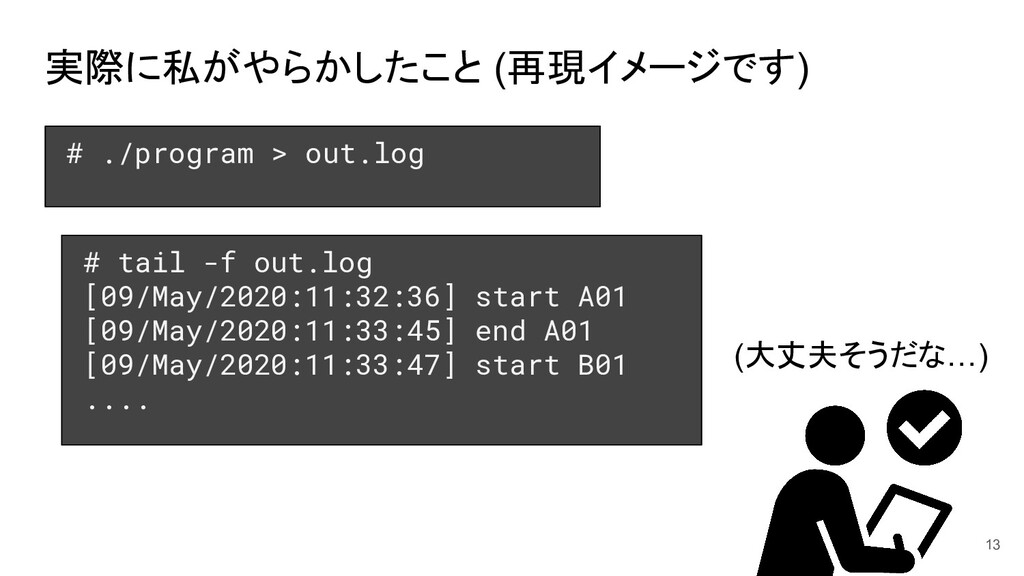
実際に私がやらかしたこと (再現イメージです) 13 # ./program > out.log # tail -f
out.log [09/May/2020:11:32:36] start A01 [09/May/2020:11:33:45] end A01 [09/May/2020:11:33:47] start B01 .... (大丈夫そうだな…)
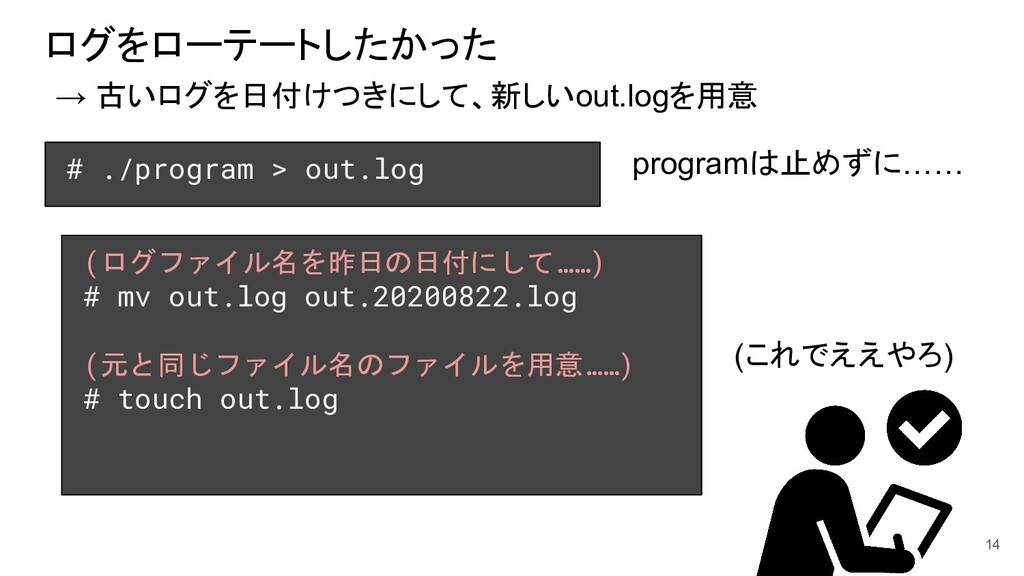
ログをローテートしたかった → 古いログを日付けつきにして、新しいout.logを用意 14 # ./program > out.log (ログファイル名を昨日の日付にして……) #
mv out.log out.20200822.log (元と同じファイル名のファイルを用意……) # touch out.log (これでええやろ) programは止めずに……
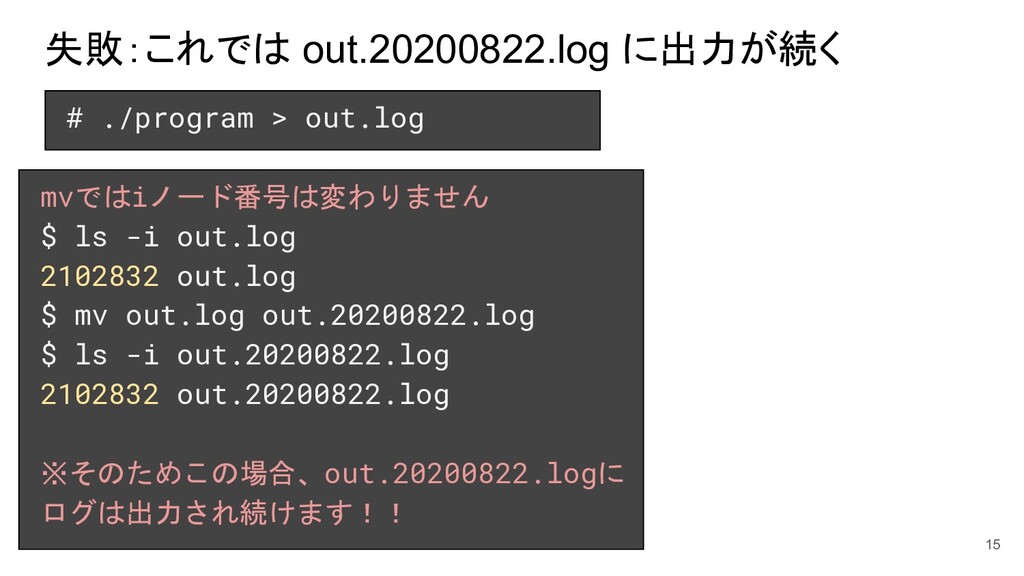
失敗:これでは out.20200822.log に出力が続く 15 # ./program > out.log mvではiノード番号は変わりません $
ls -i out.log 2102832 out.log $ mv out.log out.20200822.log $ ls -i out.20200822.log 2102832 out.20200822.log ※そのためこの場合、out.20200822.logに ログは出力され続けます!!
失敗:これでは out.20200822.log に出力が続く 16 # ./program > out.log mvではiノード番号は変わりません $
ls -i out.log 2102832 out.log $ mv out.log out.20200822.log $ ls -i out.20200822.log 2102832 out.20200822.log ※そのためこの場合、out.20200822.logに ログは出力され続けます!! この数週間後、out.logに吐か れていると信じたまま、out.< 日付>.logは古いログと思って 消してしまった (皆さん同じ失敗しないで)
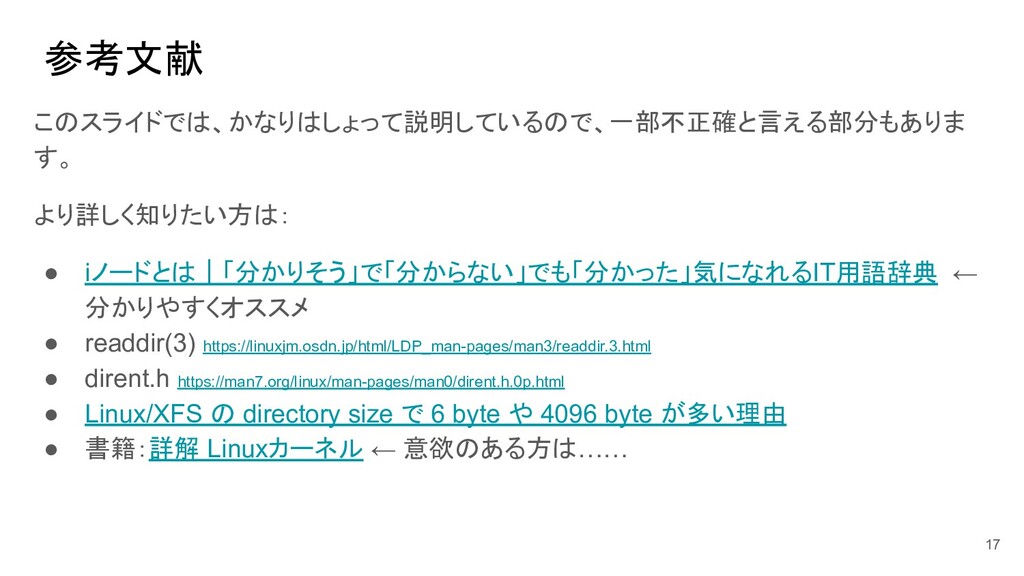
参考文献 このスライドでは、かなりはしょって説明しているので、一部不正確と言える部分もありま す。 より詳しく知りたい方は: • iノードとは|「分かりそう」で「分からない」でも「分かった」気になれるIT用語辞典 ← 分かりやすくオススメ • readdir(3)
https://linuxjm.osdn.jp/html/LDP_man-pages/man3/readdir.3.html • dirent.h https://man7.org/linux/man-pages/man0/dirent.h.0p.html • Linux/XFS の directory size で 6 byte や 4096 byte が多い理由 • 書籍:詳解 Linuxカーネル ← 意欲のある方は…… 17


 ozuma
ozuma
 kzkhykw1991
 gogutan
 takuroabe
 kentarofujii
 raspython3
 ishikawa_satoru
 persolserverworks
 recruitengineers
 colopl
 pfn
pfn
 akitoshiga
 genda
genda
 uxyall
 inesmontani
 ammeep
 tonyrice
 bluesmoon
 cassininazir
 katarinadahlin
 mojombo
 bkeepers
 afnizarnur
 techseoconnect
 andyhume